Showing posts with label Presentations. Show all posts

Friday, 29 September 2017

MAGIX PHOTOSTORY DELUXE SYNAPSE CIRCUIT NEWS


SYNAPSE CIRCUIT 
NEWS!
#MAGIX #PhotoStory #Deluxe #Presentation #Video #Editing

MAGIX PHOTOSTORY DELUXE GETS A BOOST IN PERFORMANCE!

MAGIX releases a new version of award-winning photo slideshow software, Photostory Deluxe, featuring significant performance upgrades.

MAGIX sets powerful new standards for speed, colour processing and high-end effects in digital photo presentation.

Berlin, September 25th, 2017 – The latest version of MAGIX Photostory Deluxe represents a significant upgrade in terms of performance. High-resolution image material is now processed up to five times faster, which is evident through perfectly smooth previews. Advanced full image editing enables precise photo optimization directly within the program. With new photo effects, MAGIX focuses on quality and individuality.

NEW FEATURES 

✔ Enhanced performance & technology upgrades
Everything for superior design is included, giving slideshows a high-gloss finish with high- resolution 4K images. Processing is now five times faster thanks to new, innovative, dynamic resolution reduction. Customers also have access to perfectly smooth previews.

✔ Greater precision for better results: 16-bit deep colour
A fully reworked workflow chain with 16-bit deep colour precision enables even more creative freedom with effects editing and prevents image artefacts in colour transitions.

✔ Unique slideshows created with the huge range of unique effects
Over 1,500 intros/outros, transitions, background noise and songs for popular themes such as vacation and travel have been completely redesigned in a clear new layout. Now includes five new professional high-end effects for enhancing photos. Photostory also offers one of the most popular effects around, "lens reflections".

✔ The best functions just get better and better

The program's most important functions have been enhanced too. The popular Photostory Wizard feature's interface has been optimized and can now be used for quick photo import. Full screen editing is even more advanced and can also be used in the main interface.

Photostory Deluxe is available now in stores and online.

Photostory Deluxe – € 69,99 / $69.99 / £59.99

About MAGIX
MAGIX is an internationally operating provider of software, online services and digital content for using multimedia products and services. Founded in 1993, MAGIX offers private and professional users a technologically sophisticated and user-friendly range of products for designing, editing, presenting and archiving digital photos, videos, music, documents and websites. MAGIX is the market leader in the field of multimedia software in Germany and in the most important European markets. It is also regarded as one of the most successful market participants in the USA.

MAGIX see.hear.feel.create

Thank you for reading! Review coming soon... Synapse Circuit / Blue Gene

Tuesday, 13 June 2017

MAGIX PHOTOSTORY DELUXE SYNAPSE CIRCUIT

SYNAPSE CIRCUIT 

Reviews... MAGIX PHOTOSTORY DELUXE

£29.99 SUMMER SALE

£248.98 REGULAR PRICE

#MAGIX #Photostory #PhotoEditing #VideoEditing #Presentation #Soundtrack #Video #DVD #BluRay
MAGIX is going all out to dominate multimedia; Adobe is trailing behind. As you may or may not know, Sony has pulled out of the creative multimedia software race by selling off its Creative Software range of applications that includes Vegas (video editor), Sound Forge (audio editor) and Acid (DAW).

MAGIX has a superlative attribute is that it has applications for just about everybody! The range of applications can be likened to an infinite layer of multimedia tangents cut from key audio/visual applications. This has the advantage of a pronounced seamlessness interface throughout.

Photostory Deluxe 2017 shares its DNA with Movie Edit Pro, which was cut from the Music Maker DAW application many moons ago. As you might know, both Music Maker and the range of MAGIX video editing software applications had blossomed wonderfully!

SPLICE
Above: Animation effects of still images within Photostory Deluxe. Photostory Deluxe can be seen as a marriage between a video editor, photo editor, and slideshow application such as PowerPoint. The result is very compelling… What's more is that Photostory lends itself to just about anyone! Create a digital photo/video book of your precious family moments; how about stunning intros and outros for your YouTube videos; how about a digital portfolio/showcase reel? The possibilities are there!

Above: Photo editing in Photostory Deluxe. As expected, you can output your creations to most video formats and create a DVD/BluRay disc. 

IN USE
Above: The Photostory Deluxe interface in more depth.

For the most part the user interface is straightforward; Photostory makes for a simple fuss free video editor. However, the interface can get a little confusing when incorporating animation and transition effects. It can take a while to commit the menus to memory. With a bit of effort, you could create intros and outros that resemble Adobe After Effects! Photostory can be a great tool for YouTube content creators who are starting out, on a budget, and/or don't require the kind of functionality and power of a full blown video editor such as Video Pro X (review coming soon).


Above: What you are seeing is the automatic creation of a slideshow via a selection of pictures and music soundtracks. Below: The titling aspect of Photostory Deluxe; it works just like a video editing application.

PHOTO/VIDEO COLOUR MATCHING

One of the many great aspects of Photostory Deluxe is that you can take the colour attributes of a photo or video and add it to different photos and videos - even if the photos/videos were taken with a different camera/camcorder to create a uniformed look. Below: Transition and fades.
CONCLUSIONIn the world of smartphone photography and videography, Photostory Deluxe is a must have! I'm sure you've got great material on your phone and/or in the cloud doing absolutely nothing. Photostory Deluxe will transform your videos and photos into works of art. Make a simple slideshow out of your photos and add some background music! Hey, you make your own royalty free music using the free version of Music Maker or any of the commercial versions.


Above: Export options... From video file to DVD and BluRay.

MAKING A WISH
The Multimedia Designer in me would want to see a means for creating interactive presentations in a similar vein to PowerPoint. DVD/BluRay have limited interactions but an executable CD ROM/DVD/BluRay would be ideal for interactive displays and kiosks. It'll make for a means of creating interactive promotional materials for creatives such as bands,filmmakers, photographers, and so on. Or output to HTML5 for online learning. I can see it now… MAGIX Multimedia Designer… 

SCORE
Photostory Deluxe is a great presentation creator...

Photostory Deluxe scores a spectacular... Synapse Circuit Platinum!

Thank you for reading! Synapse Circuit / Blue Gene

Friday, 10 March 2017

REALLUSION CRAZYTALK ANIMATOR 3 SYNAPSE CIRCUIT REVIEW


SYNAPSE CIRCUIT 

THE RE-ANIMATOR? THAT'S CRAZYTALK!

Reallusion CrazyTalk Animator 3 Pipeline Edition $259 (check prices online) Review!
#Reallusion #CrazyTalkAnimator3 #2DAnimation #Cartoons

Those amazing guys at Reallusion never ceases to amaze, that’s why they are amazing! Every time I see a product preview/demonstration, I get blown away! To review Reallusion software is to be dumbfounded, excited and inspired.

Here’s the Synapse Circuit review of CrazyTalk Animator 3 (Pipeline Edition).

PINCH
CrazyTalk Animator is a 2D animation software that has to be used to be believed! Think about the time it takes to create one episode of your favourite cartoon series. Well, within an incredible short space of time, you will be able to create your very own cartoons! If you are looking for a way to start realizing your cartoon animated ambition, look no further. If you happen to be an experienced artist/illustrator and want to create and animate your own creations, CrazyTalk Animator 3 Pipeline is definitely the software for you! It’s available for the PC and MAC platforms. I reviewed the PC version.  
02.png
You will be pinching yourself using this awe inspiring animation software.

EVOLVE
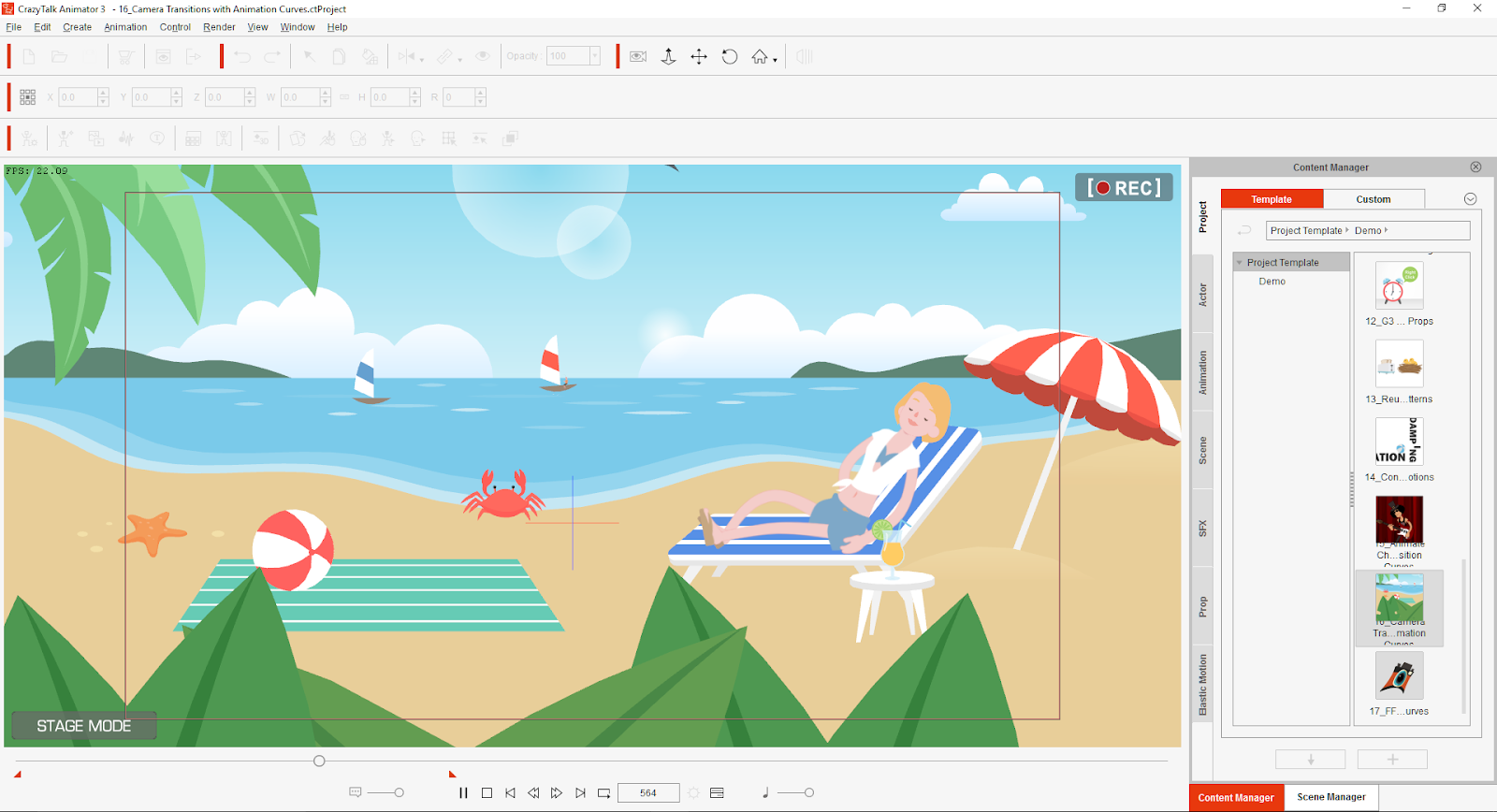
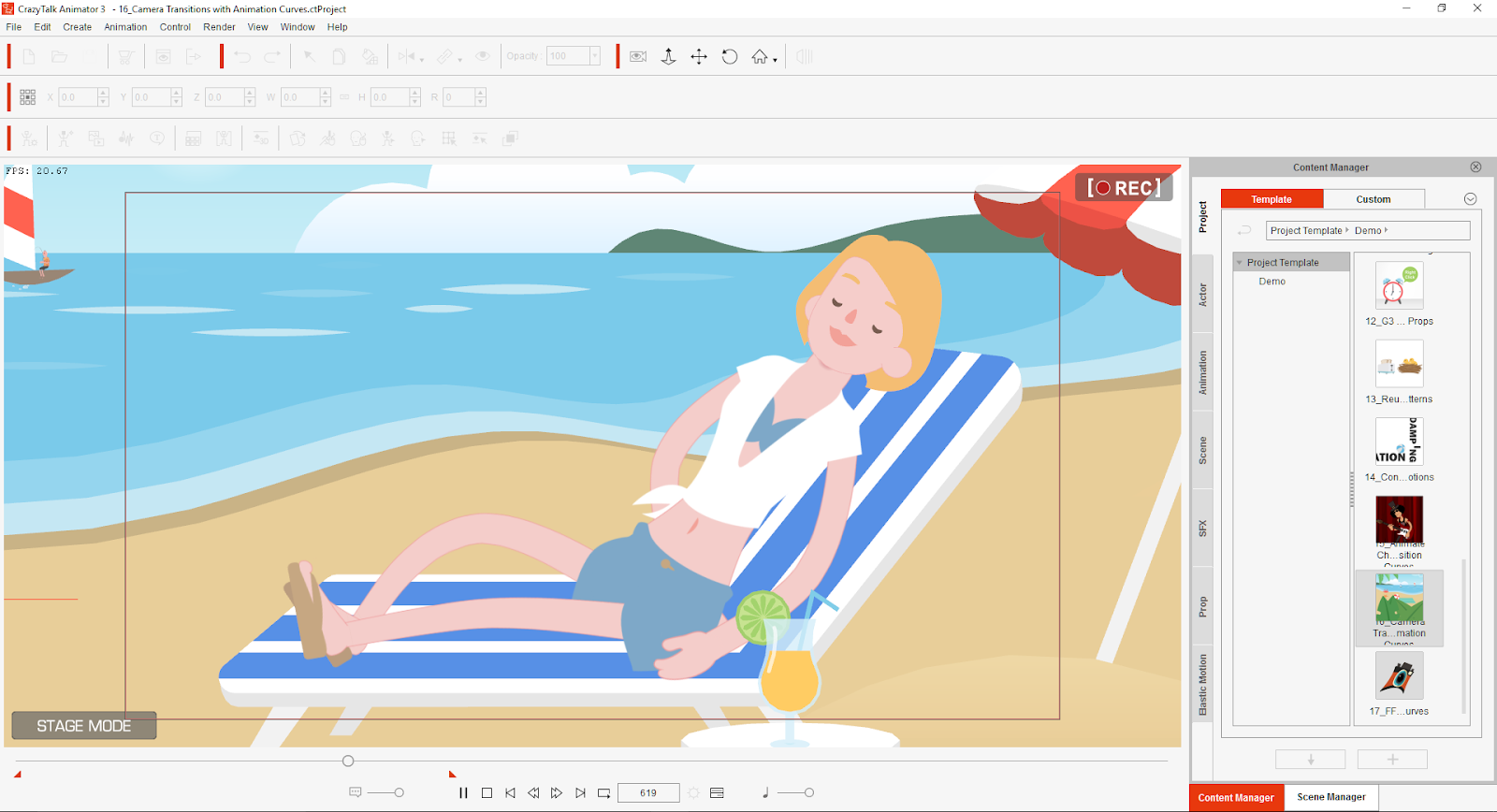
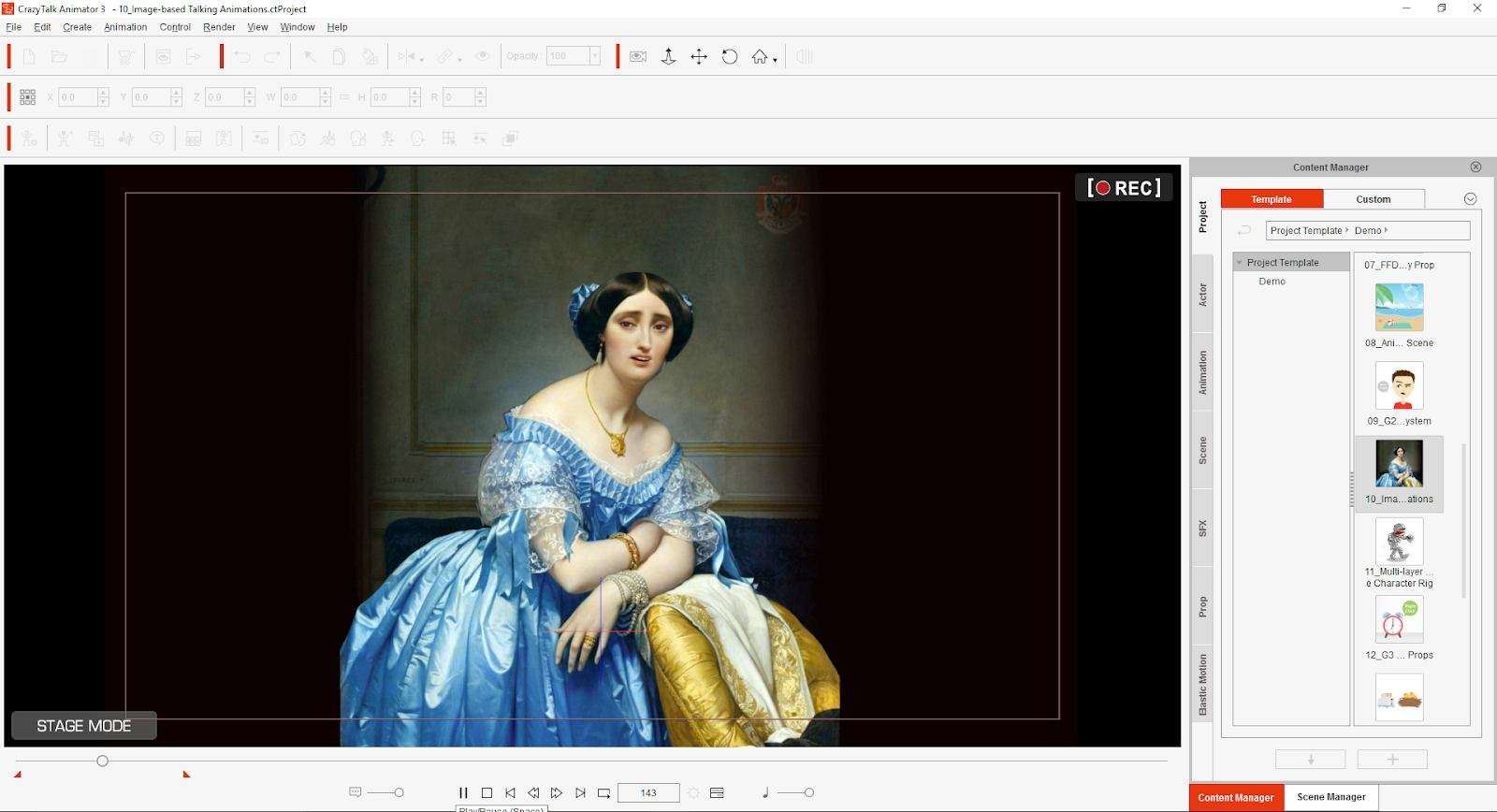
Me? I have zero talent in creating animation but after doing the tutorial, I feel that I can be creative as there are usable templates that features characters and props. What’s more, is that I can animate just about anything using photos and scanned images.
03.png
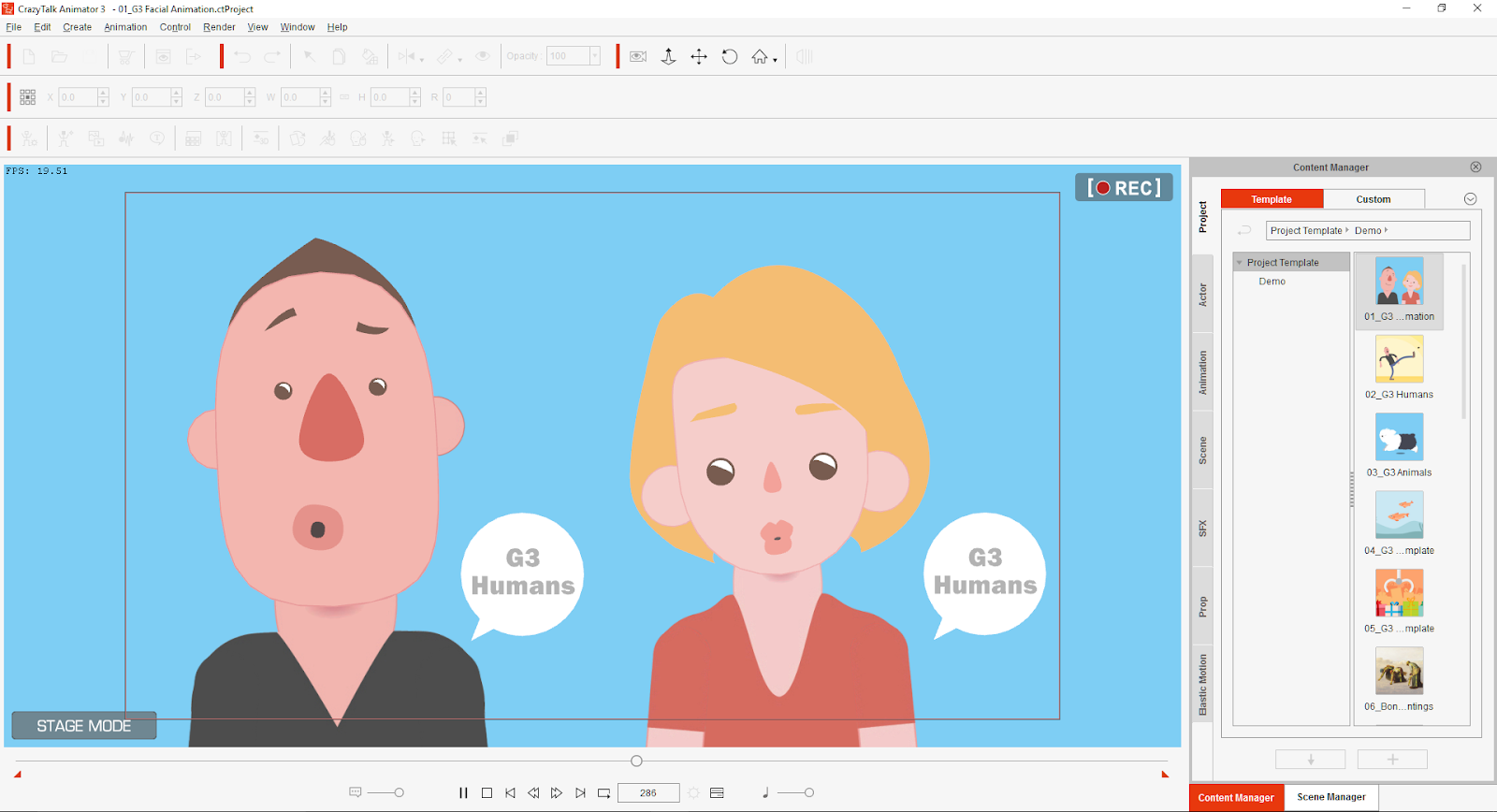
I can create a vocal recording and the automatic lip sync makes light of characters appearing to talk in sync with the recorded audio speech. You can also use Text-To-Speech WAV files and CrazyTalk Script. The Facial Animation facility is just nuts! I have used previous incarnations of CrazyTalk and it is truly astounding how the software improves with each version; just when you thought it couldn’t get any better, it does! Reallusion makes creating 2D animation easy and painless!

I would recommend going for the Pipeline version as it packed with features and additional characters and pros. Plus you can download more via the Pipeline!

IN USE
04.png
Bear in mind that I am not yet an illustrator, I am confident that given a bit of time, I will be able to create like the professionals. I mean, just look at how simple the Hello Kitty character is drawn and how iconic she is! I am currently learning to use Affinity Designer by Serif. Affinity Designer has replaced DrawPlus. So, if you have DrawPlus or Affinity Designer and you happen to be talented at illustration and character creation, then Reallusion CrazyTalk Animator 3 (Pipeline) and the aforementioned Serif illustration software is a marriage in Animation Heaven!

That said, if you happen to be Photoshop or equivalent based then you should be able to create brilliant animation with photos. You can create your own style! There is always room for more animation artistry.

CrazyTalk Animator 3 Pipeline edition is so very, very easy to use. If you are, like me, not very good at animation you can just drag and drop predefined animations in the Content Manager.

CONCLUSION
05.png
Reallusion CrazyTalk Animator 3  Pipeline Edition is the pinnacle of 2D animation software, no other animation software is as easy to use and is as cost effective.

There is a strong tutorial resource on the Reallusion website: www.reallusion.com

I strongly recommend that you do the tutorials as they are easy to follow, step by step instructions that will allow you to become familiar with the interface and how make the most of the software! You could be creating fantastic cartoon animation and become a YouTube content creator! WOW!

CrazyTalk Animator 3 is capable of professional results, outputs to HD and 4K. The beauty is that it is within reach of anyone who can find a use for it:-

Professional Animators TV/Film

Presentation Creation Designers

Educational Institutions & Animation/Media Teachers

YouTube Content Creators

If your project could do with some unique 2D animations then this is your one stop solution!

The PC I used is an 5 year old AMD quad core based, just imagine what can be done with a PC of today’s insane specifications! Just add a USB audio recording device and you have a studio in which you can have vocal actors voicing your characters!

This is why PCs are still relevant today. Sure, they aren’t selling as much because most households have access to Social Media and the Internet via their mobile devices. But if you want to do something creative on the PC such as real professional animation, Reallusion CrazyTalk Animator 3 is the way to go! I am looking to get an infinitely better PC soon! I have some ideas… Sssh!
SCORE
Reallusion CrazyTalk Animator 3  Pipeline Edition scores an effortless Synapse Circuit Double Platinum! Get it now! You’ll hate me for about a week because I can guarantee that you will be pinching yourself. You will be pinching yourself at how wonderful the interface is to use and with the results!

Thank you for reading! Synapse Circuit/Blue Gene

Tuesday, 26 August 2014

SYNAPSE CIRCUIT CRAZYTALK ANIMATOR 2 ANIMATED AVATAR

 SYNAPSE CIRCUIT
CRAZYTALK ANIMATOR 2...

Good evening, Synapse Circuit Readers. As always, I hope that all is well in your world! I also hope that your Bank Holiday wasn’t ruined with the unrelenting rain that was torrential at times! I feel for the carnival goers this year! What a wash out! Oh well... Next year!

...BRINGS ANIMATED AVATAR INTO PRESENTATIONS & VIDEOS

London, (August 26, 2014)
— Reallusion extends CrazyTalk Animator’s usefulness into everyone’s daily life. CrazyTalk Animator 2 is a fully-featured animation tool designed for storytelling, and for presenters to quickly add animated avatars and comic effects into PowerPoint, Keynote, Google Doc and other presentation software. With its full editing capabilities, well categorized content libraries, and no monthly fees, users can easily design unique characters and specific motions to later copy-and-paste to most web and office applications.

Users can now quickly turn boring presentations into show-stopping, animated demos with captivating openings, persuasive pitches and interactive storytelling that could present all by themselves.  See how to make an effective presentation with comic avatar.

A NEW WAY OF PRESENTING WITH ANIMATED AVATARS
It’s not surprising that presenters are now looking towards new ways of captivating and engaging audiences, and this has never been easier to do than with animated avatars which provide a means of effective communication in 4 very important areas.

1. Emotional Appeal: where presenters engage audiences with visuals instead of text, making things much more fun to watch.

2. Power of Storytelling: where we set the mood and empathetically guide our audiences into seeing things from our perspective.  

3. Memorable Identity: what we do when dropping visual cues and recognizable avatars to create association.

4. Relaxed Interaction: when we break down mental barriers prior to having audiences endorse our ideas.

With an explosion of online explainer videos, its not a mystery why marketing agencies, boardrooms and businesses are now looking towards easy-to-use applications that require little to no artistic skills or experience. This has brought a surge of online services that offer quick but limited content and rights. These services can also be pretty pricey even when you are not using them every month, not to mention their incompatibly with everyday tools like PowerPoint, Keynote, Evernote and others.


This is where CrazyTalk Animator 2 comes in, as it gives you all the ease and speed in animated production, while providing unlimited customization options, 100% royalty free content and absolutely no hidden or monthly fees.

WHAT IS CRAZYTALK ANIMATOR 2?
CrazyTalk Animator 2 is a revolutionary animation suite with all the necessary tools to easily create highly customized animations without any background experience.
CrazyTalk Animator 2 provides an exciting new approach to traditional 2D animation with innovative tools that allow users to easily customize comics, photo-face avatars, and facial lip-syncing. Users can also apply 3D motions to 2D characters, while opening new possibilities for freely editing 2D motions and viewing them from any angle with a single click. Combined with functional features like facial puppet and body motion key editing, it has become the most creative software for 2D character animation and quick capture export for use with 3rd party presentation tools.

Pricing and Availability:
CrazyTalk Animator 2 is available in 3 different versions for Mac and Windows PC to fit any creator’s budget. Download versions of CrazyTalk Animator 2 are available from the Reallusion Online Store at: http://www.reallusion.com/store/purchase_cta.aspx
CrazyTalk Animator 2 Standard: £37.99

CrazyTalk Animator 2 Pro: £129.99

CrazyTalk Animator 2 Pipeline: £229.99

How to make an effective presentation with comic avatar: http://www.slideshare.net/reallusion2014/ppt-for-slidesharecom-36057948

Reallusion now offers 100 free animated GIFs to enrich the projects:  http://www.reallusion.com/crazytalk/presentation/gifbonus.aspx
For more info, free download and best presentation package, please visit: http://www.reallusion.com/crazytalk/presentation/default.aspx

ABOUT REALLUSION, INC.

Headquartered in Silicon Valley, Reallusion is a leading-edge software developer providing cinematic animation tools for PC, Mac and mobile platforms.  Reallusion’s pioneering storytelling technology excelling at character animation, facial morphing and voice lip-sync allows fast creation of interactive avatars for 3-D real-time filmmaking and previsualization for professional post-production. Their powerful yet easy-to-use tools make character animation accessible to both Mac and PC users of all skill levels. Reallusion’s development of core technologies and growing base of intellectual property firmly establish the company as power among emerging technology innovators, furthering their graphic and imaging embedded kernels to top-brand device manufacturers worldwide. http://www.reallusion.com/

STANDBY FOR MORE NEWS, REVIEWS & COMPETITIONS!

Please check out the Synapse Circuit site here: Synapse Circuit.com

Yes, I am well aware that the site is due an update soon! It’s coming...

Synapse Circuit for tech news, opinions, articles, reviews and competitions. You will find interactive PDF magazines, videos and links to free legal software! Check it out at Synapse Circuit dot com