Thursday, 12 June 2014

SYNAPSE CIRCUIT MAGIX Audio & Music Lab 2014 Premium

SYNAPSE CIRCUIT
NEWS!
NEW! MAGIX Audio & Music Lab 2014 Premium!

Good evening, Synapse Circuit Readers. As always I hope that all is well with you and yours! Right now I am baking in the hot summer night heat!

#Magix #Audio&MusicLab2014Premium

MAGIX Presents Redesigned Version of Audio Cleaning Series! Gosh!

London, UK (12th June 2014)
– MAGIX has extended the Audio Cleaning Lab product series with the release of MAGIX Audio & Music Lab 2014 Premium. This new, redesigned version of the successful MAGIX Audio Cleaning Lab software now provides ambitious users with even more options for digitizing, recording, editing and optimizing music, speech and videos.

With its wide range of functions and extras MAGIX Audio & Music Lab 2014 Premium is the Swiss Army Knife of the audio editing world. The extra visualization tools in the program make it easier to identify and edit volume or frequency problems in audio material. In addition to the spectroscope, peak meter and spectrogram, Audio Music Lab 2014 Premium also includes a bit meter, a correlation meter and a direction meter.

For the first time since its original launch the user interface in the Audio Cleaning series has been fully redesigned. The product series stands out from the crowd thanks to its optimized design which allows the user to adjust the interface to fit the screen, guaranteeing access to all of buttons on the interface regardless of the monitor size.

The Premium version now includes the same professional audio technology used in Samplitude® and Sequoia® to provide maximum quality and flexibility. Among other advantages, this technology makes it possible to edit studio projects with a resolution of up to 96 kHz/24-bit.

Another new addition is the five professional essentialFX plug-ins from Samplitude® that allow users to optimize vocal recordings, apply chorus/flanger effects, remove noise and give recordings more punch.

Premium version users are now able to import and export videos, and optimize video sound. When playing imported film clips on a track the video monitor can be detached and resized, which means it is possible to work on two monitors simultaneously and check all of the added effects, optimized video sound and commentary down to the finest detail.


Premium Advantages:

Superior audio quality (up to 96 kHz/24-bit resolution)

All buttons and tools visible no matter how the interface is resized

Precise preset settings

9 visualizations for detailed graphical analysis of audio material

5 essentialFX plug-ins

Video sound optimization

Resizable and detachable video preview monitor

More than 360 different presets for sound optimization

VST interface for additional audio plug-ins

Spectral editing

Edit multiple files or apply effects to several objects simultaneously using batch processing

Premium user interface with up to 2 audio tracks

Price & Availability:

MAGIX Audio & Music Lab 2014 Premium is now available from MAGIX on line and Amazon at £79.99 SRP

About MAGIX:

MAGIX is a leading international provider of high-quality software, online services and digital contents for multimedia communications. Since 1993, MAGIX has been developing leading technologies for creation, editing, management and presentation of photos and graphics, videos and music. Internationally, MAGIX operates from branches in the USA, Canada, the UK, France, Italy, Spain and the Netherlands. The product range is targeted towards laymen and professionals alike and goes beyond the PC range to include seamlessly integrated online and mobile applications.


According to its retail sales figures, MAGIX leads in the multimedia software sector in Germany and the most important European markets, and is one of the most successful competitors in the USA. Fifteen years of market presence as well as one thousand awards worldwide testify to the company's power of innovation.
STOP THE PRESS!!!!

The winners of the Magix Samplitude Music Studio 2014 will be announced this coming Monday, 16 June 2014! The response has been amazing! Thanks to all those who have entered!

THANKS FOR READING...
Please check out the Synapse Circuit site here: Synapse Circuit.com

Yes, I am well aware that the site is due an update soon! It’s coming...

Synapse Circuit for tech news, opinions, articles, reviews and competitions. You will find interactive PDF magazines, videos and links to free legal software! Check it out at Synapse Circuit dot com

Thursday, 5 June 2014

SYNAPSE CIRCUIT APPLE HAILS ANDROID

SYNAPSE CIRCUIT
APPLE HAILS ANDROID @ WWDC 2014!
Good evening, Synapse Circuit Readers. I hope that all is well with you! I also hope that the Sun is out where you are! Over here in London the Sun has come out at last! Yay!

Did you catch the Apple WWDC 2014? What did you think of it?

TRASH TALK?
As predicted Apple did their usual overhyped style of presentation; some of it was good, iOS 8 certainly looks like a great improvement only that Cook and co were hyping attributes that Android users have been taking advantage of for a few years now i.e. interactive notifications, Hey, Siri is OK, Google, widgets, Quick Typing and the ability to use third party keyboards such as SWIFT. It’s no big deal as I have always said that mobile device interactions shouldn’t be a cause for the Tech Wars we’ve been watching. Apple has also tried to encroach upon Samsung’s Galaxy 5 and Gear health applications without previewing any hardware but we know that Apple wearables are coming!

Then there’s all this trash talk against Microsoft and Android... Typically, none of it makes sense and spewing such drivel has marred this year’s WWDC. Naturally, there is nothing at all wrong with competition but if you’re going to use graphs and pie charts you ought to base them on facts.

Yes, Apple is now “cool” again because they have bought the Beats technology from Dr. Dre for $3 Billion. Not! Lol! What will make Apple cool again is innovation. What is definitely not cool is to constantly accuse Google of “stealing” technology and then finally catching up to it in the forthcoming iOS. And speaking of Google...


GOOGLE i / O 2014
Yes, that’s the one we are all looking forward to regardless of loyalty to the Android operating system and devices. You may have already noticed that Google has bought up a lot of technologies and is also at the forefront of wearables i.e. Google Glass & Android Wear. Plus there’s the Ara modular handset for starters! Naturally, a lot of Google users on both Apple and Android devices are very curious as to what Google Apps will bring for each platform and cross-platform capabilities. Many of us are wondering about new Nexus devices and, of course, whether we’ll be seeing a 64-bit Android 5 or 4.5, Lollipop! What enhancements will be added to Chrome the browser and OS? Will Chrome and Android merge in some way? We’ve seen how Apple OX Yosemite and iOS 8 works seamlessly together I think this is where Chrome and Android are heading. The Chrome OS is a great but you can’t install software such as Photoshop, PagePlus, MovieMaker, etc to name some popular PC software. I said that I was going to take a look at Chrome applications and I will very soon and write an article on it. I cannot deny that I am so used to my PC that Chrome as an operating system seems a little alien to me. Watch the Synapse Circuit space for more on Chrome OS and apps!

 Then there’s Android TV and Chromecast... What will happen in that area?

I am also wondering if there will be some advancement for developers such as a visual app creator to empower those that want to create simple HTML5 based apps for the purpose of small business promotions. I would imagine that for serious app developers there will be an improvement upon development programming tools such as Android Studio which is currently still in development; I hope to hear an announcement to say that it is out of beta / preview. I must say that I was a tad disappointed when Google dropped its app builder: App Inventor. However, you may be pleased to know that the App Inventor is with the educational institution MIT and App Inventor 2 is in beta. I must find the time to have a go at creating an app using this facility; it’s looking good!

I am getting pretty excited about Google i / O as they are very much mavericks and you just don’t know what they are going to come up with! Google has a great capacity to amaze and impress. I do appreciate the laidback style of presentation and that Larry Page and co wish to use technology to enable us all. I think that is the difference between Apple and Google: Apple likes to compete with marketing hype talk and Google prefers to let their tech do the talking.

Google i / O starts on June 25 – 26 2014 at the Moscone West Convention Centre in San Francisco.

THANKS FOR READING...

Please check out the Synapse Circuit site here: Synapse Circuit.com

Yes, I am well aware that the site is due an update soon! It’s coming...

Synapse Circuit for tech news, opinions, articles, reviews and competitions. You will find interactive PDF magazines, videos and links to free legal software! Check it out at Synapse Circuit dot com
Friday, 30 May 2014

SYNAPSE CIRCUIT DAZ 3D DAZ STUDIO PRO 4.6

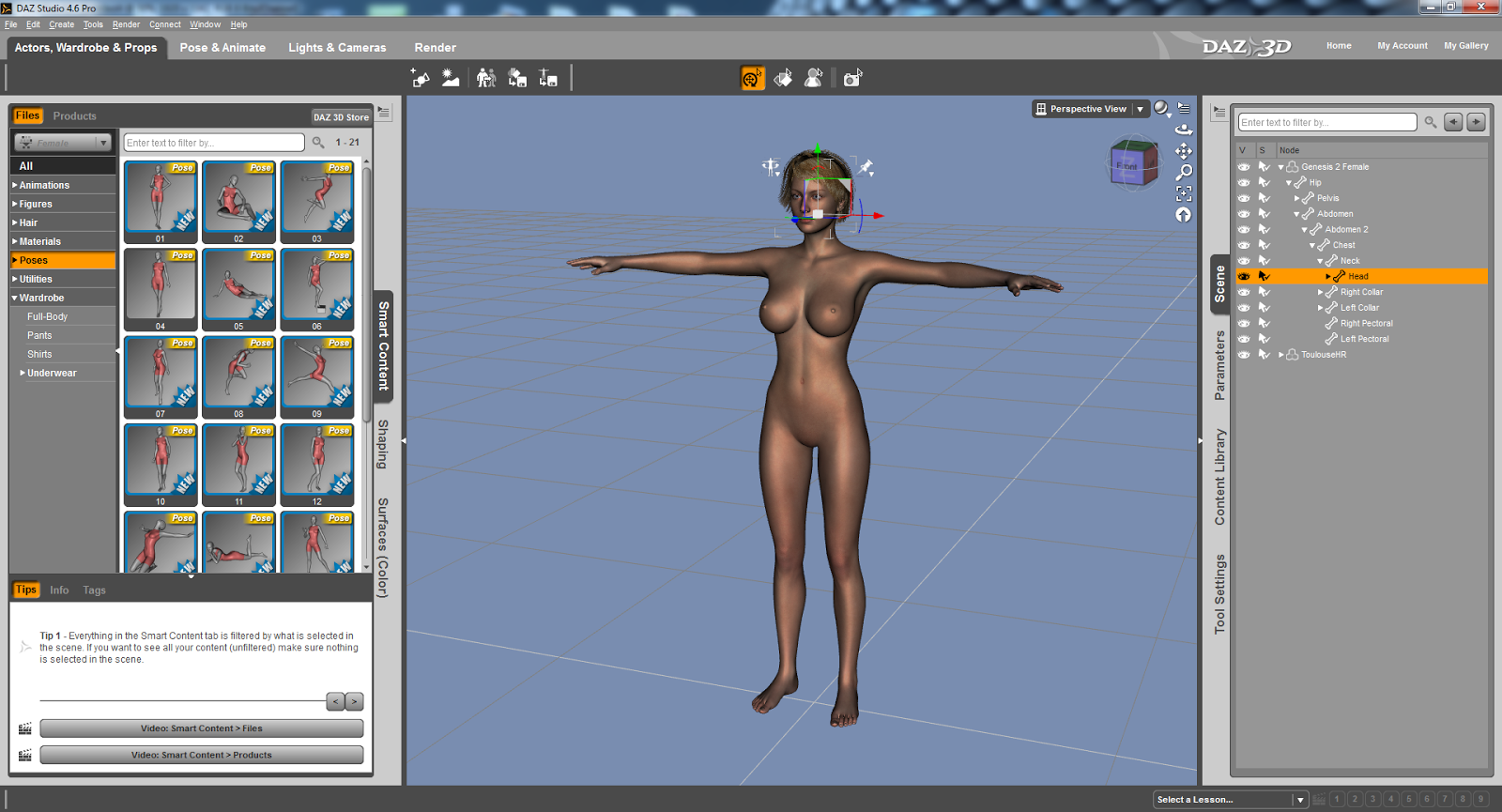
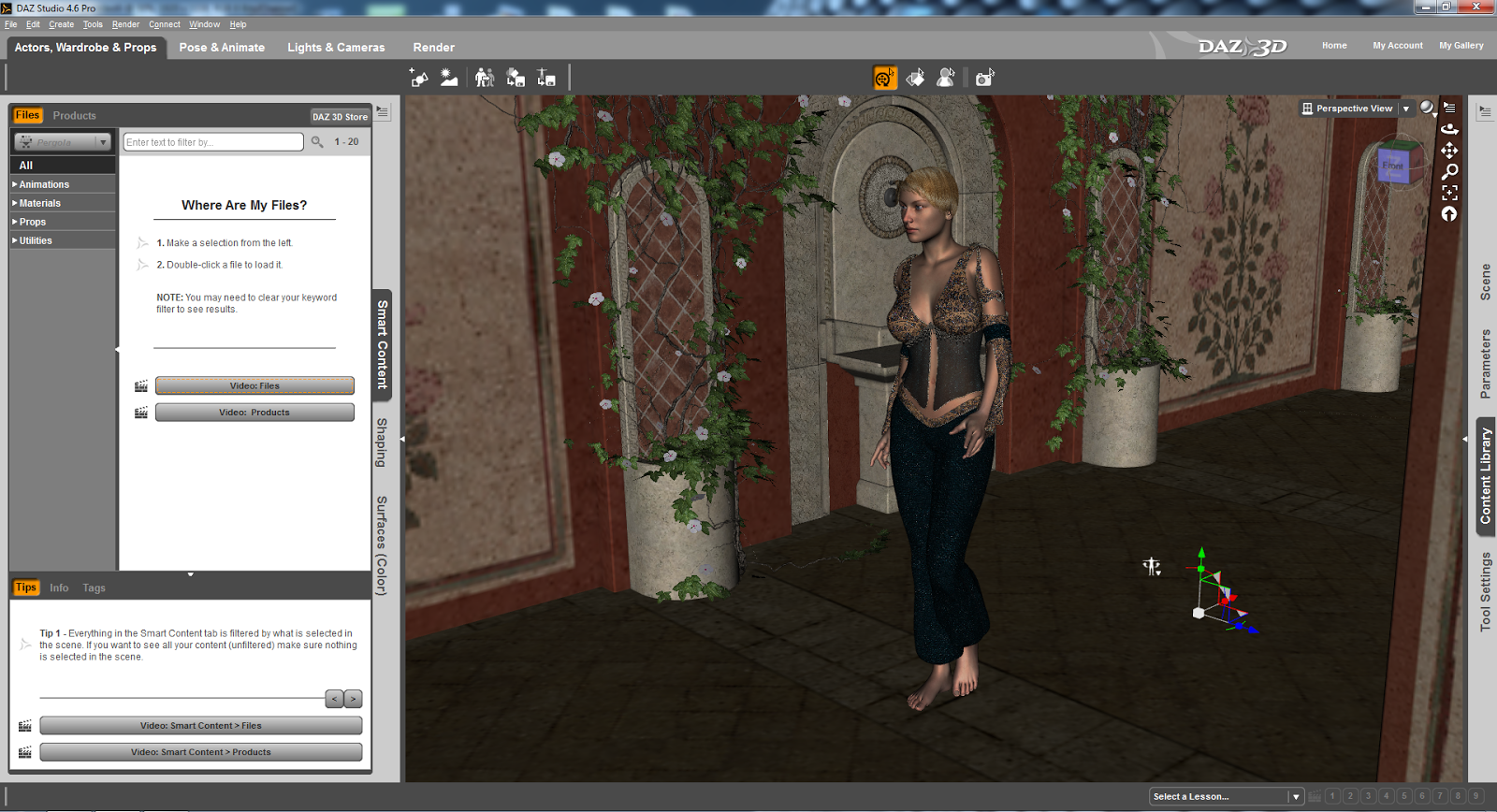
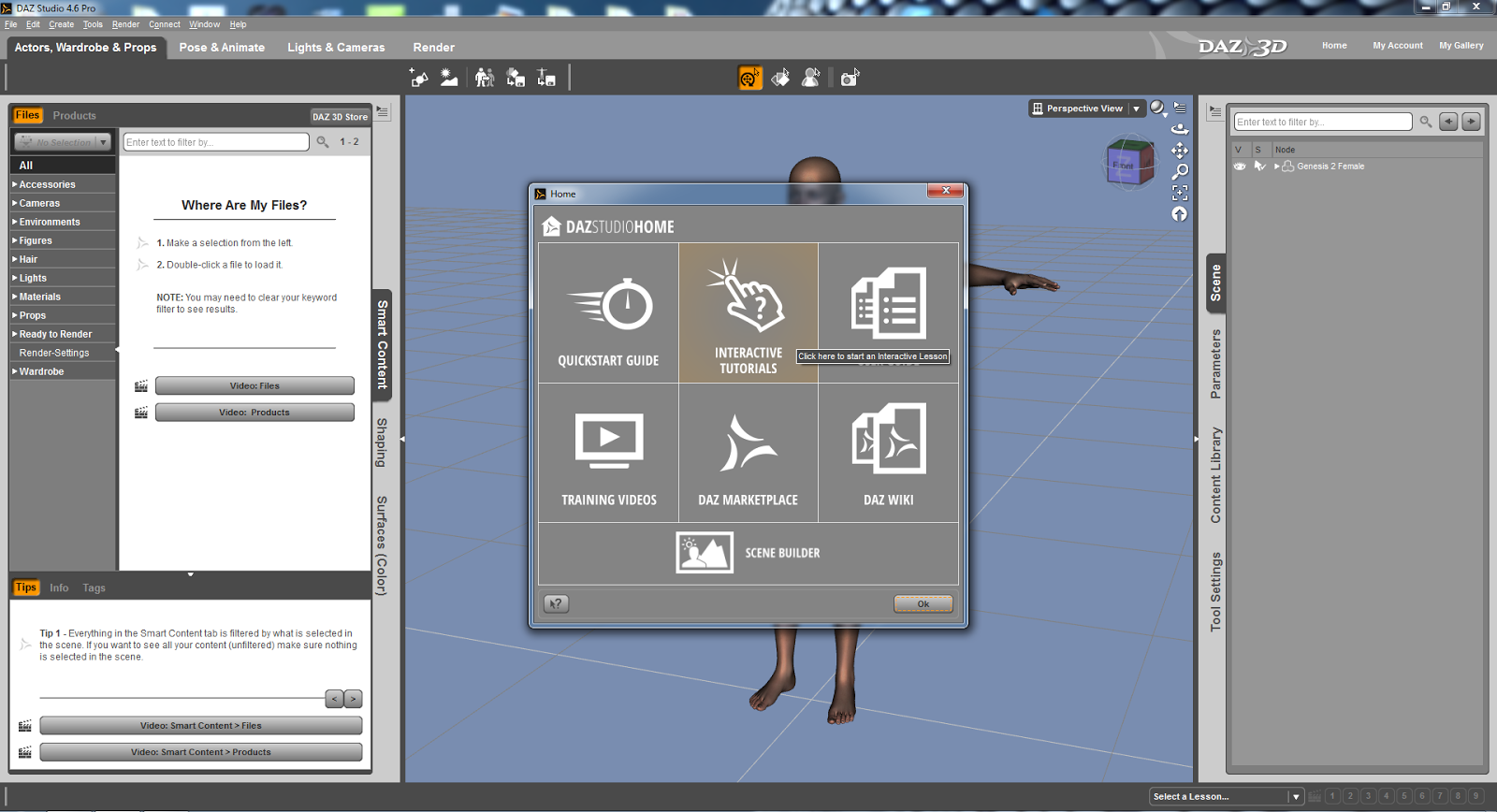
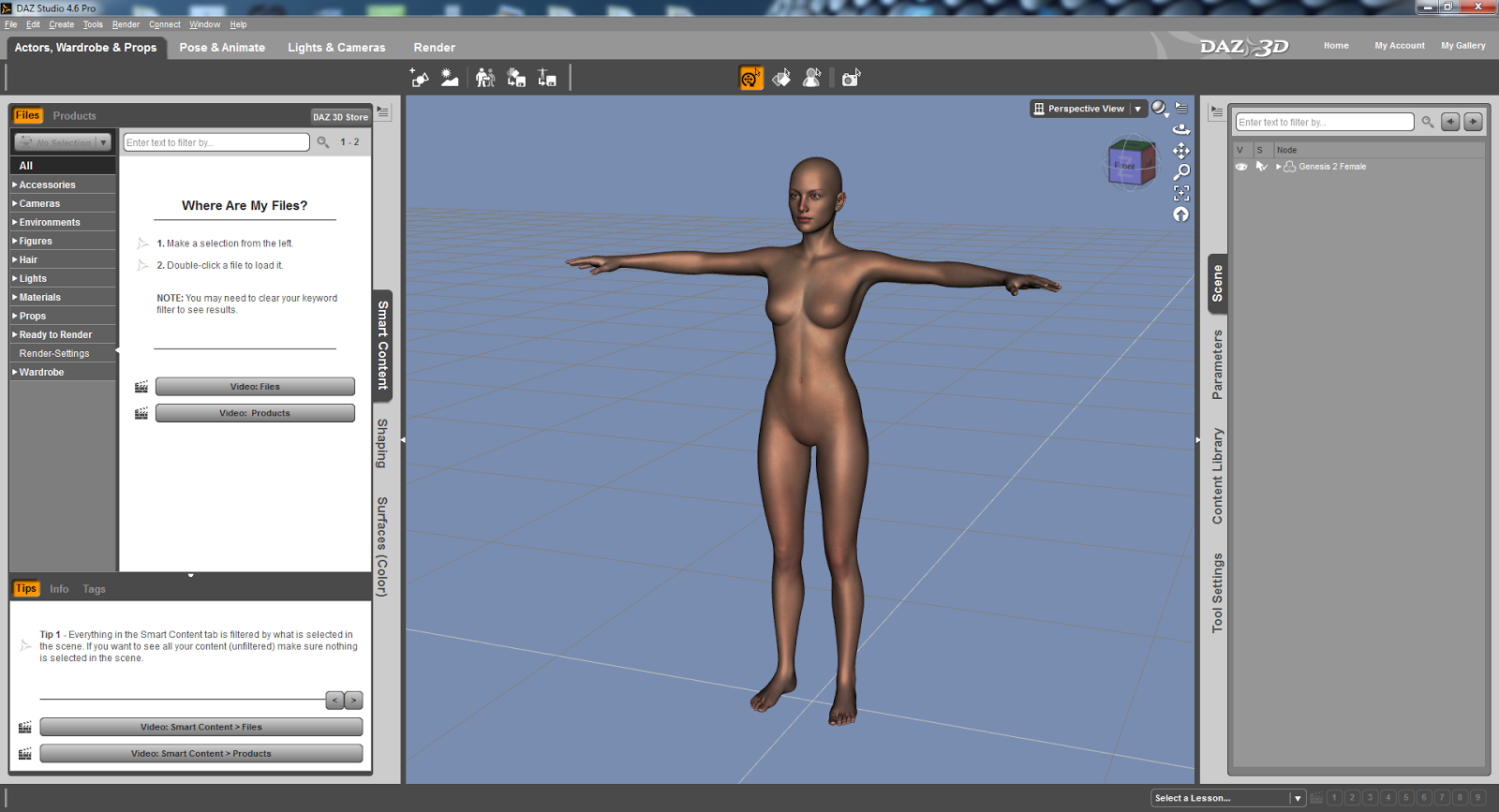
Above: Here's something I did in minutes!
Above: Here's the DAZ Studio Pro rendering process. Amazing, huh?
SYNAPSE CIRCUIT
ANIMATION SPECIAL PART THREE: DAZ 3D DAZ STUDIO PRO 4.6
32 & 64-bit

PRICE: FREE

#DAZ3D #DAZStudioPro4point6 #FreeSoftware #3DAnimation #3DGraphics

Good evening, Synapse Circuit Readers. How’s it going? I hope that you are well and that you are on the up and up! Positive thinking equals positive actions!

Seemingly random health tip: Check your blood for vitamin D deficiency!

Yes, the Synapse Circuit Animation Special is taking flight! A few days ago I had the pleasure of reviewing the fantastic Poser Pro 2014 by Smith Micro and before that I reviewed the amazing CrazyTalk Animatior 2 Pipeline software. Now I am bringing you a review of DAZ Studio Pro 4.6 from DAZ 3D! What’s more is that it’s free! YAY!!

INTRODUCTION
DAZ stands for Digital Art Zone – it took me how long before I learned that??? Lol! Well, now you know if you didn’t before! It’s bizarre... Many, many Moons ago I got an earlier version of the software on a magazine cover; I tried it and I did not like it. Again, I can be quite impatient with software – if I can’t understand it within an hour of constant use then I give up! How wrong was I? VERY!

Another problem I had and still have with DAZ Studio Pro is that it is fussy when it comes to graphic cards. Fortunately I have another system to use that features a better graphics card! Let the review commence! 


THE DAZ STUDIO PRO 4.6 INTERFACE
I appreciate the DAZ Studio environment a lot! I find it modern, easy going on the eye and very well executed. If you are a beginner you will appreciate the great tutorial material available that allows you to make the most of the program. And like the Poser Pro interface you can drag palettes to suit. Oh, I should tell you that DAZ Studio Pro 4.6 is very similar to Poser Pro 2014 but I have to say that I do prefer the DAZ Studio Pro 4.6 interface. It is perfect for beginners whereas Poser Pro 2014 appears to be aimed at intermediate to advanced artists – this is not to say that a beginner can’t get to learn it but because DAZ Studio Pro 4.6 is free it makes it easier for the beginner to explore. The main part of the interface is compartmentalized for convenience and expedience. 

Again, still waxing on the similarities with Poser Pro 2014, DAZ Studio Pro 4.6 operates by encouraging users to purchase models, props, scenes, textures, etc through its interface. By the looks of things I would recommend that you opt to make a subscription:

The Platinum Club

$24 – for 3 months.
$70 – gets you an annual subscription.

The advantage of the Platinum Club is that you can get great discounts on additional materials. It is a great system; it looks very, very inexpensive indeed.

Going back to the interface... I found it to be very intuitive even though it can get quite complex.


TUTORIALS

There is a great tutorial to get one started whereby you recreate a still graphic called ‘Fiery Genesis’ which was remarkably easy to achieve.

When the program is launched there is an option to start with tutorial material.

Having looked – albeit briefly – at other tutorials I can see that they are just as easy to follow! I feel very, very confident that I will be able to get to grips with DAZ Studio Pro 4.6 very quickly!


CONTENT

Again, in comparison to Poser Pro 2014, there are a lot of content to get you going with DAZ Studio Pro. What I have noticed is that the model, Genesis 2, looks pretty much of a high quality compared to Poser Pro 2014. With Poser Pro it is the rendering that determines the quality. But the model appears to be already rendered in a high quality within the pre-rendered interface.

Another thing to take into consideration is that the models are not anatomically correct. This may prove to be a crucial factor for natural artists. I can understand DAZ’s decision to not include such materials as I would imagine that minors are able to download this software for free but it’s what we are born with and in this day and age there shouldn’t be a fuss about genitalia. If anything there should be an option to have more detailed models through an age verification system that requires a credit card. I do believe that it is possible to use anatomically correct textures via third party developers if this is of an importance to you. However, the range of detailed textures via the DAZ 3D site is astounding!

Oh, if you happen to have Reallusion’s iClone 5 you can import DAZ Studio 4.6 models and animate them! WOW! Watch out for my coverage of iClone 6 – it promises to be a mega update! I can hardly wait! From what I have heard and what I know about Reallusion you will NOT be disappointed!


GENERATE SCENES

There are some scenes included and DAZ Studio Pro 4.6 has come scene generating capabilities too! And once again you download so many scenes to suit – for a small fee! You can get some free content too.

What I appreciate about DSPro 4.6 is that it is pretty fast with fairly complex 3D backgrounds / scenes.

ANIMATION
There are some predefined animations that can be dropped onto the actor and it is that simple – very much the same as Poser Pro 2014, iClone 5 and CrazyTalk Animator 2.

You can also purchase animations through the online DAZ 3D store.

RENDERED EVEN MORE SPEECHLESS
I have to say that I was very, very impressed with DAZ Studio Pro 4.6! The models looks great, the scenes are awesome and there is so much more to the software that I could write a lot more but time eludes me as always!

DAZ Studio Pro 4.6 is fast – so much so that it feels like I am working in a photo editing / manipulation program! There again you will need a decent system to get the most out of it – something like a game or video editing rig!

CONCLUSION

Yes, DAZ Studio Pro 4.6 is a great 3D animation / graphic software that is compatible with Poser Pro 2014 and iClone. What’s more amazing is that it is FREE!!!!

The interface is perfect for the beginner! What are you waiting for? Go get it!

SCORE: DOUBLE PLATINUM

STOP THE PRESS!!!!

WIN! WIN! WIN!

Win a copy of CrazyTalk Animator 2!

We have 5 CrazyTalk Animator 2 PRO copies for the top prize!
And we have 5 CrazyTalk Animator 2 Standard copies for five runner ups!

Wanna enter? Great! Just answer the following questions:

A. Name 3 characters in the animated series Futurama. Can you?

B. Can you name the software house behind CrazyTalk, iClone and FaceFilter?

C. Can you name the voice actor behind SpongeBob SquarePants?

Do you know the answers? Great! Send them to: competition @ synapse.circuit.gmail.com

Rules:

Winner is chosen at random.
One entry per person.
Your information will not be shared with any other party or parties.

Competition closes: 30 June 2014
Winner announced: 7 July 2014

You have enough time to find out the answers!

THANKS FOR READING...
Please check out the Synapse Circuit site here: Synapse Circuit.com

Yes, I am well aware that the site is due an update soon! It’s coming...

Synapse Circuit for tech news, opinions, articles, reviews and competitions. You will find interactive PDF magazines, videos and links to free legal software! Check it out at Synapse Circuit dot com

Thursday, 29 May 2014

SYNAPSE CIRCUIT SMITH MICRO SALE

SYNAPSE CIRCUIT
SMITH MICRO SUPER–BUNDLE SUPER-SALE!!!!

Good evening, Synapse Circuit Readers. It’s good to see you as always! Keep those competition entries coming!

#SmithMicro #PoserDebut #AnimeStudioDebut10 #ClipStudioPaintPRO

BE THE DIGITAL ARTIST YOU WERE MEANT TO BE!
Here’s your chance to get all the software tools you’ve been curious about for a special price. Make an interactive comic, render a 3D figure, create a short cartoon or draw a manga character. What Will You Create?™


POSER DEBUT
Finally there's an easy, fun way to learn 3D and be creative, even if you can't draw or have never taken an art class. Poser Debut is a 3D playground. Create scenes, add 3D characters, pose them, animate them and make cool images or videos.


ANIME STUDIO DEBUT 10

Bring your imagination to life! Anime Studio is your complete animation program for creating 2D movies, cartoons, anime and cut out animations. Create your own desktop animated shorts or produce animations for film, video, commercials or streaming over the web.


CLIP STUDIO PAINT PRO
Also known as Manga Studio 5, CLIP STUDIO PAINT PRO is the ultimate software tool for comic and manga creation. Whether you want to simply enhance and perfect your pen-and-paper illustrations or experience a completely digital creative process.


MOTIONARTIST
Transform your vision into interactive digital stories with state-of-the-art animatics! Create interactive and professional-quality videos, animations, web graphics and business presentations through the power of HTML5.

READ THE SYNAPSE CIRCUIT POSER PRO REVIEW HERE: 

Poser Pro 2014 Review


THANKS FOR READING...

Please check out the Synapse Circuit site here: Synapse Circuit.com

Yes, I am well aware that the site is due an update soon! It’s coming...

Synapse Circuit for tech news, opinions, articles, reviews and competitions. You will find interactive PDF magazines, videos and links to free legal software! Check it out at Synapse Circuit dot com

SYNAPSE CIRCUIT EDIFIER EXTREME BLUETOOTH SPEAKER


SYNAPSE CIRCUIT
EDIFIER LAUNCHES EXTREME CONNECT PORTABLE BLUETOOTH SPEAKER WITH CARRY CASE

Good evening, Synapse Circuit Readers. I hope you’ve had a great day! And if your day is still unravelling there is still time! Yay! Keep those competition entries coming! You could be a winner!

#Edifier #BlueToothSpeaker #PortableBlueToothSpeaker

SOUND OFF!
Reading, UK, May 29th, 2014; Since its inception in 1996, Edifier has developed a worldwide reputation for developing and Marketing visionary speaker systems that combine state-of-the-art design with a sound quality reflecting one of their core strengths: ‘Passion for sound’. Edifier announces its latest addition to its Image range – the Extreme Connect.


The Extreme Connect is a fully portable speaker that features Bluetooth connectivity so you can play music from your phone, tablet or computer. The two front-facing speaker drivers give incredible sound. Wirelessly play your music both at home and on the go with this brilliant Extreme Connect speaker from Edifier.

Instant access to your music - the Bluetooth connectivity allows you to play music stored on your smartphone, tablet or computer from up to 10m (30ft) away. For any device which doesn’t feature Bluetooth, the auxiliary input can be used.

Big sound, small speaker - you can enjoy incredible, clear sound from such a small device due to the two front-facing, full-range speaker drivers and rear facing bass radiator.

The Extreme Connect is available in Black, Blue, Grey, Yellow and Red

Main Features:
·         Microphone and call answer/end buttons for hands-free and conference calling
·         Built-in lithium-ion battery can last up to 12 hours depending on usage
·         Supports miniSD and microSD cards so you can insert and play your preloaded music
·         A USB port enables charging and streaming with the use of a USB cord (not included)
·         Two active neodymium drivers and one passive radiator for enhanced sound

What's in the box?
·         Edifier Extreme Connect Bluetooth speaker
·         AC power cord
·         Carry case
·         Documentation

Technical specifications:
·         Power output: 2 x 2W
·         MicroSD card: maximum capacity: 32GB; format: FAT32
·         Bluetooth: V2 +1 EDR supported profiles; A2DP; AVRCP; max range: 10m (30ft)
·         Speakers: 2 x 48mm, magnetically shielded
·         Passive driver: 5cm x 9cm (1.9" x 3.5")
·         Power: built-in 1400mAh rechargeable lithium-ion battery
·         Measures (h x w x d): 6.1cm x 15.9cm x 4.2cm (2.3" x 6.2" x 1.6")
·         Weight: 450g

Input/output:
·         3.5mm AUX input
·         MicroSD card slot
·         USB port

Price and Availability:
The Extreme Connect is available at £59.99 from Richer Sounds

About Edifier:
Edifier International specializes in the design and manufacturing of high-end consumer audio electronics for both the lifestyle and multimedia markets, providing a wide selection to suit each individuals taste. Edifier International is renowned for its development and use of acoustic technology, superior manufacturing standards and uncompromised quality in design and production of audio electronics. 

Edifier is committed to excellence in all audio markets in which it operates, which include PC audio, multimedia audio, docking audio, IT lifestyle audio and home lifestyle audio. Edifier is committed to excel and extend the audio experience into further evolving both the global brand and product recognition, with a passion for sound.

Edifier continues to expand it operations and presence, moving towards the goal of becoming a world class, internationally recognized company specializing in quality audio solutions for the ever evolving consumer electronics industry.

THANKS FOR READING...

Please check out the Synapse Circuit site here: Synapse Circuit.com

Yes, I am well aware that the site is due an update soon! It’s coming...

Synapse Circuit for tech news, opinions, articles, reviews and competitions. You will find interactive PDF magazines, videos and links to free legal software! Check it out at Synapse Circuit dot com
Wednesday, 28 May 2014

SYNAPSE CIRCUIT CRAZYTALK COMPETITION

Above: The brilliant CrazyTalk Animator 2 in action! You can win it!
SYNAPSE CIRCUIT
WIN A COPY OF CRAZYTALK ANIMATOR PRO

Good evening, Synapse Circuit Readers. Are you feeling lucky? Are you? Go ahead! Make your or someone’s day!

WIN! WIN! WIN!

Win a copy of CrazyTalk Animator 2!

We have 5 CrazyTalk Animator 2 PRO copies for the top prize!
And we have 5 CrazyTalk Animator 2 Standard copies for five runner ups!

Wanna enter? Great! Just answer the following questions:

A. Name 3 characters in the animated series Futurama. Can you?

B. Can you name the software house behind CrazyTalk, iClone and FaceFilter?

C. Can you name the voice actor behind SpongeBob SquarePants?

Do you know the answers? Great! Send them to: competition.synapse.circuit @gmail.com

Here’s a link to the article just in case you missed it: Reallusion CrazyTalk Review


RULES:

Winner is chosen at random.
One entry per person.
Your information will not be shared with any other party or parties.

Competition closes: 30 June 2014
Winner announced: 7 July 2014

You have enough time to find out the answers!

THANKS FOR ENTERING...
Please check out the Synapse Circuit site here: Synapse Circuit.com

Yes, I am well aware that the site is due an update soon! It’s coming...

Synapse Circuit for tech news, opinions, articles, reviews and competitions. You will find interactive PDF magazines, videos and links to free legal software! Check it out at Synapse Circuit dot com
SYNAPSE CIRCUIT POSER PRO 2014

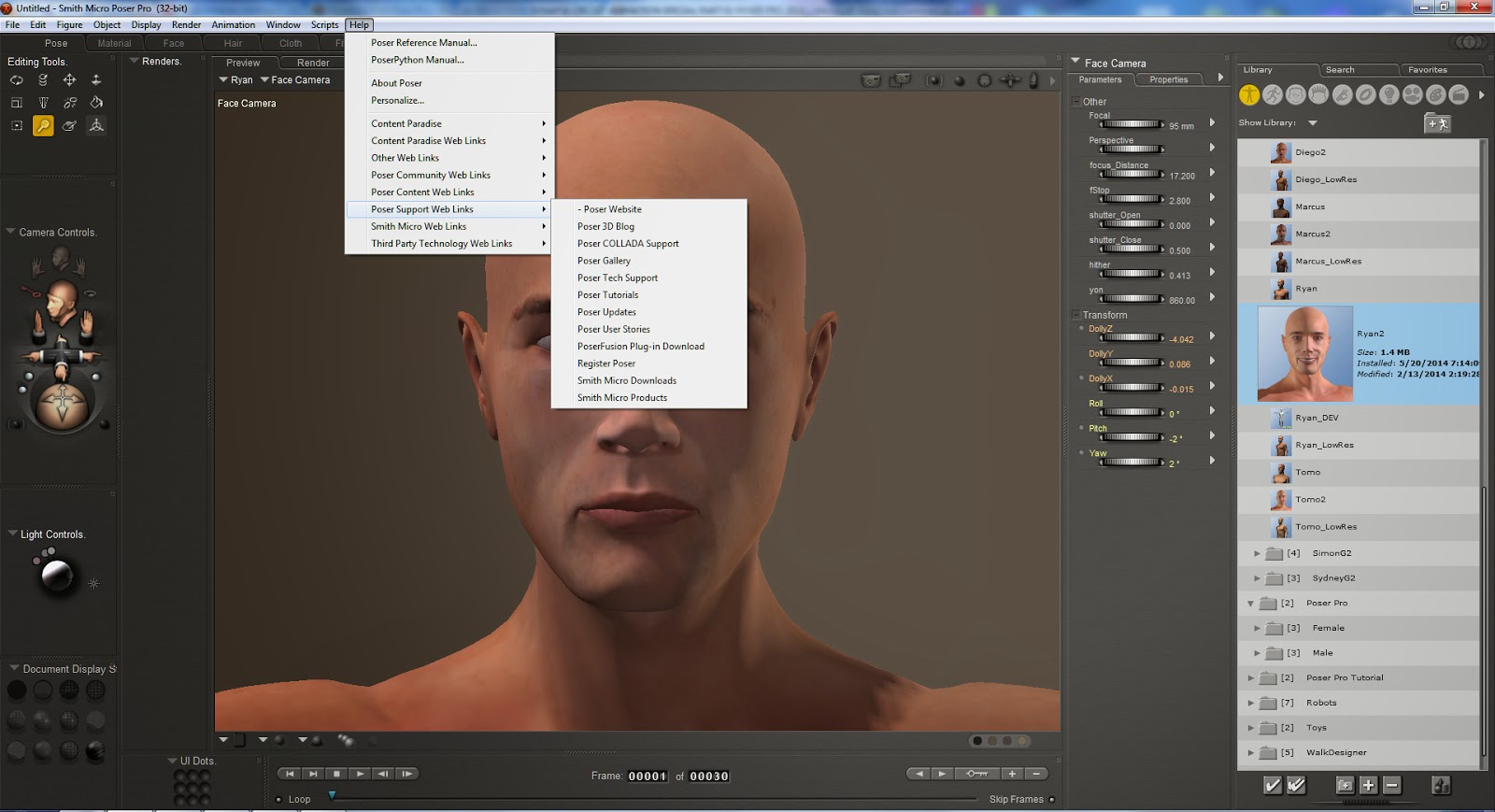
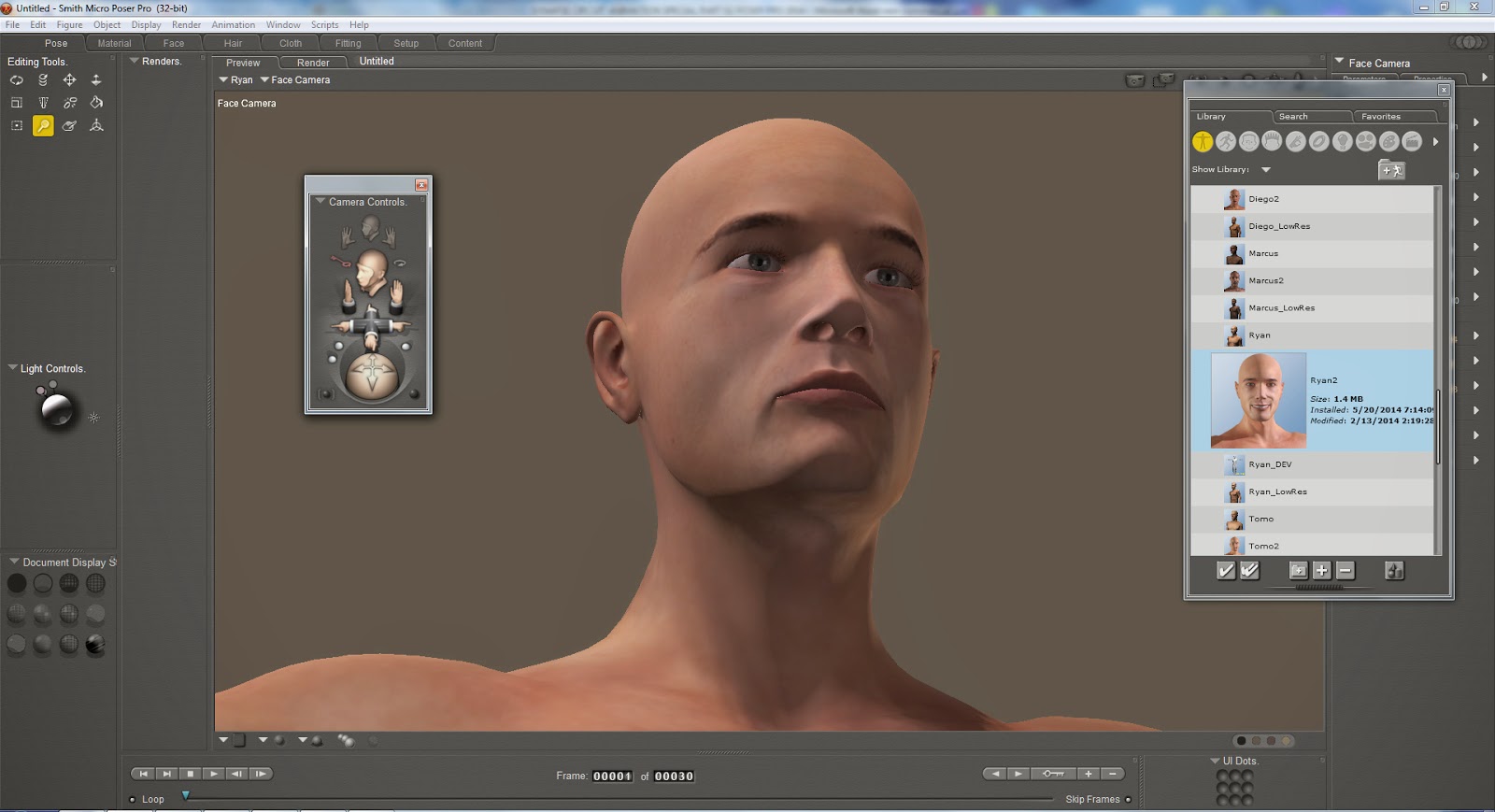
Above: The Poser Pro 2014 interface. Smile!

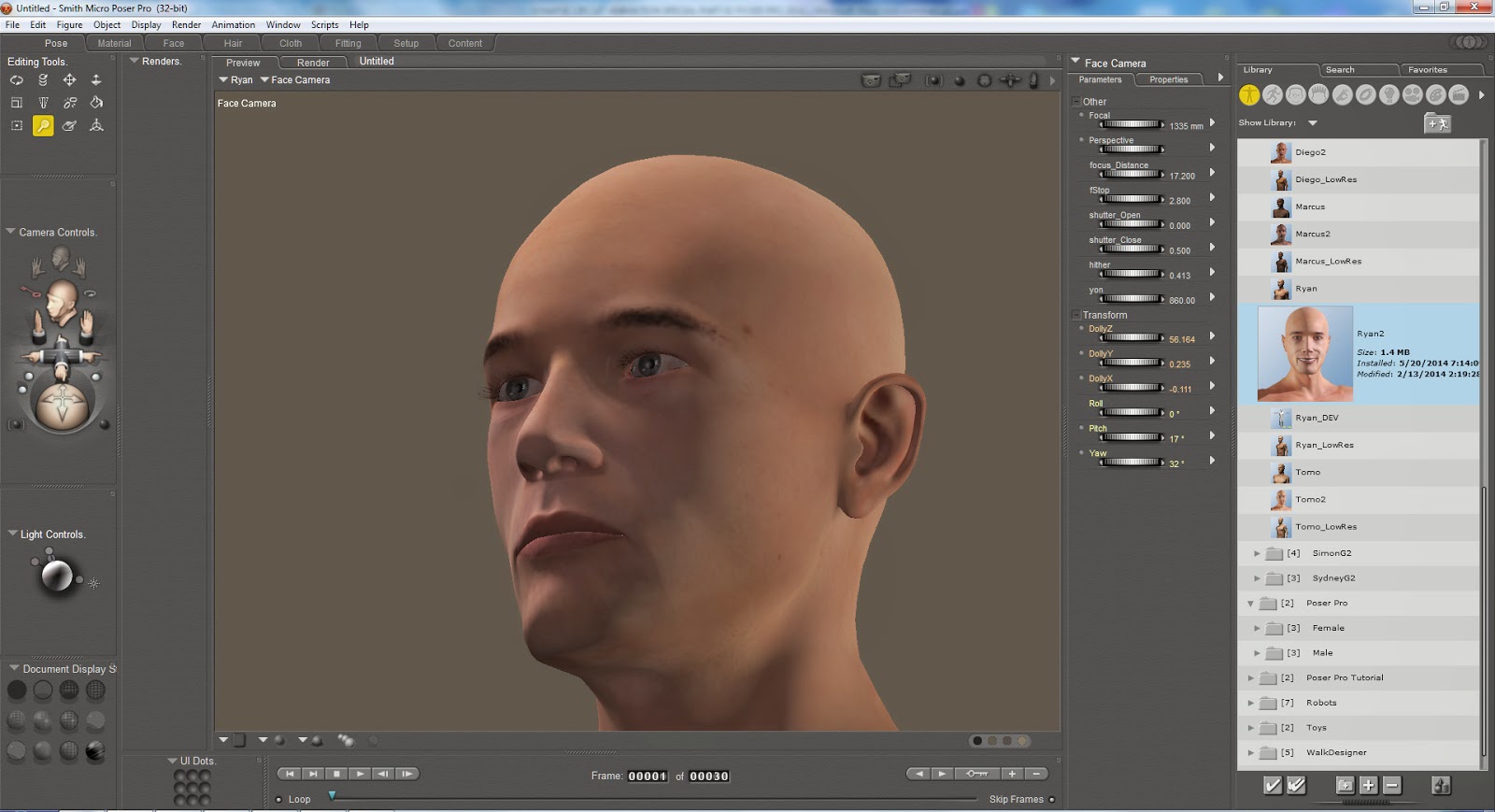
Above: A low resolution render PNG. 1920 x 1080.

Above: A high resolution render PNG. 7000 x 3938, 300 dpi.
SYNAPSE CIRCUIT
ANIMATION SPECIAL PART TWO: SMITH MICRO POSER PRO 2014
32 & 64-bit
PRICE: £359.95

Good evening, Synapse Circuit Readers. I hope that all is well! What a rainy grey day is has been! Yes, as promised here’s the second part of the animation special!

INTRODUCTION
Creating 3D animation can be very, very difficult for a lot of folk – especially if they are used to using the likes of Photoshop, PhotoPlus, etc. I myself have been taking steps into the wonderful world of 3D with Reallusion iClone and now Poser Pro 2014 by Smith Micro.

Check it out!


POSER PRO 2014 INTERFACE

The interface appears a little daunting and I would imagine that for beginners it is doubly so! I am reminded of software by MetaTools which Poser has originated form – if memory serves!

Anyway, I never really got to use any of the MetaTools in my graphic design development and as a result the interface wasn’t as straightforward like I had anticipated. You know me; I like to get there without consulting the manual. On this occasion I had to check out the tutorial material. The interface is layered to say the least.

But, hey! It’s no bad thing to consult tutorial materials as 3D – if you aren’t used to working such programs – is a fairly detailed undertaking! Normally, if I can’t crack a software interface within 20 minutes of messing with the interface I either give up (if it does the job of another program that is easier to use) or struggle with it if it has benefits over the established programs (of a similar nature). I can honestly say that Poser Pro (2014) is very much worth taking the time to learn. 


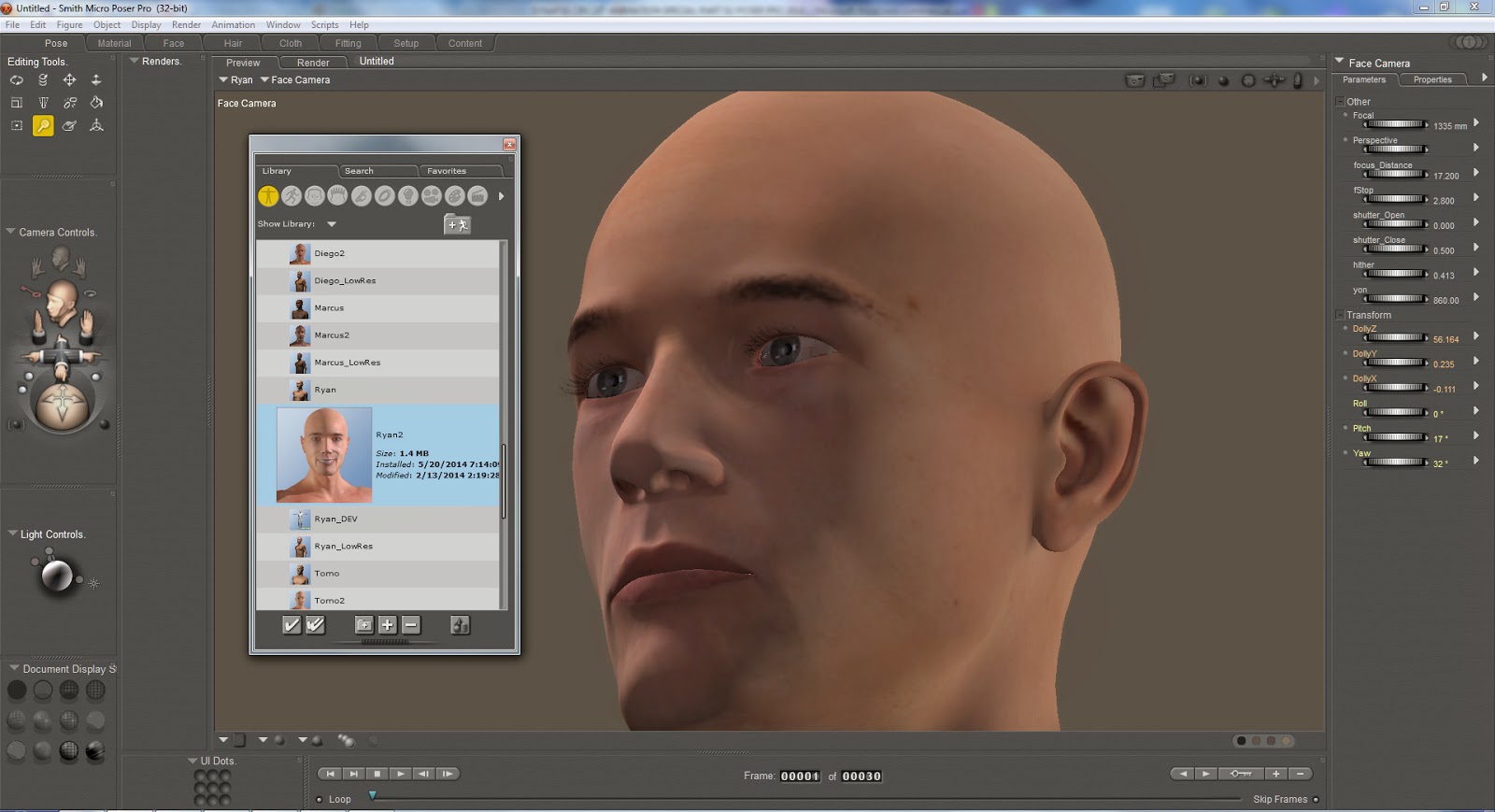
The palettes can be removed and placed to suit the way you work. See figure above. I couldn’t find a way to reset all the tools to their original values but putting the palettes back to their original settings wasn’t a problem.


Once you get the hang of the Camera Controls you will find that your confidence goes up somewhat as mine did! 


TUTORIALS
If you wish to get into 3D for animation and illustration purposes I advise you to check Poser Pro out and look at the tutorials. The Poser Interface 101 will get you going.

If you look at the above figure you can see how to get to the tutorials. The tutorials are by Charles Taylor of Nerd3D Graphics are short and sweet; they tell you the all so important basic aspects of the software so that you can get quickly started. As you would expect everything falls into place.

Oh, I even managed to find a Quick Start Guide within the program by accident! Lol! As you can probably tell I am starting to become familiar with Poser Pro. Within 45 minutes of looking at tutorials I could move around the interface more intuitively.


CONTENT
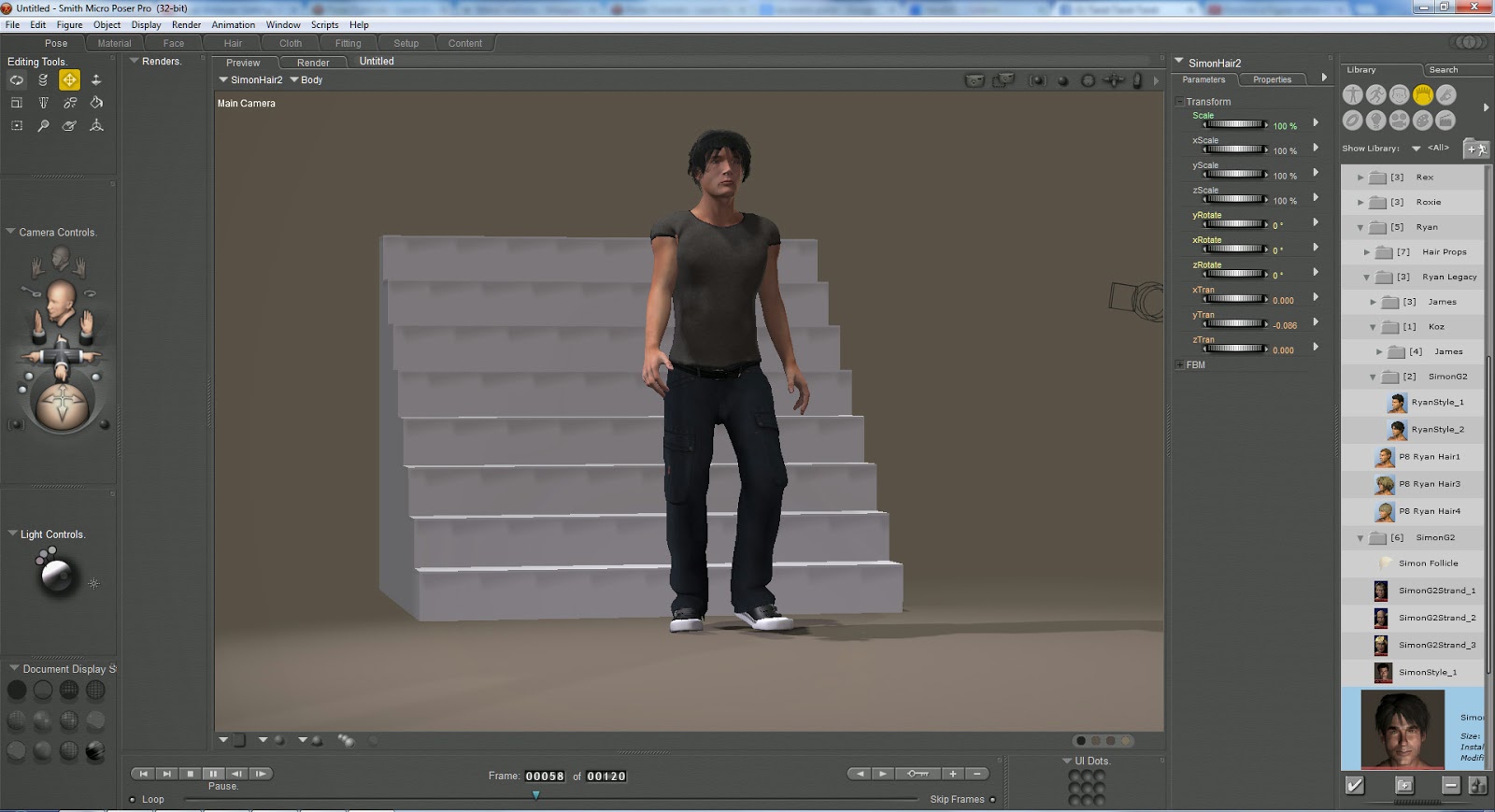
There’s a great amount of content to get started with: human figures such as “Ryan 2” that you can see as the main figure that I have been working with to follow a tutorial; human skeleton (male, female and child); animals – including dinosaurs and robots.

There are also supporting props such as clothing and hair for example for specific models!

The content makes it easy to get started with a base model that you can quite easily edit in terms of body size, musculature, and facial expressions and so on. There are also some predefined poses too!

If need be the human figures can have genitalia which I would imagine is great for figure artists and not to mention other uses...

You can also purchase additional materials i.e. more models, props, textures, etc.

STEALING SCENES
There are some scenes that come as default and to create one is a matter of double clicking on it and it is there in minute (depending on how powerful your PC is).

As you’d expect you can download more scenes from various sources which are linked from within the software interface.


ANIMATION
Animation was pretty easy to do with the Walk Designer settings for example. However, I found it frustrating to get the animation right as the actor’s feet would partially disappear into the ground. It looks like I am going to have to invest more time into the tutorials! Lol!

In essence I found that it was very, very easy to get an animation going. There’s a lot more scope for animation and I feel confident that I will be able to create some decent movies or stills.

RENDERED SPEECHLESS
Poser Pro 2014 is capable of rendering beyond 1080p. I rendered a still image at 7000 x 3938 pixels at 300 dpi! Great stuff! It’ll be great not only for movies but stills too! It’s brilliant for digital artists. I was quite impressed that I was able to do so much after spending about an hour with the software. Admittedly I am not familiar with 3D applications and after using Poser Pro 2014 I know that I will become very good at it with the help of the tutorials.

I can see a wide scope for Poser Pro: movie makers; TV and graphic design.

CONCLUSION

I think that it is only fair to let you know that there are aspects of the program that I do not yet understand such as Python Scripting. I wouldn’t know how to write one but there are loads of scripts to enhance the interface functionality. Again, there are tutorials for Python Scripting.

There is a lot of depth to Poser Pro 2014 and that’s why I wholeheartedly recommend it! You would be pushed to outgrow it in a hurry!

The only niggles I have with it is that the interface is a little busy even though it is organized quite well one has to wade through the many menus. There should be a function to prevent the actors’ feet from going through the floor. I could not find away to adjust the actor once I applied a walking on the spot animation. I am not saying that these functions are not there it’s just that they aren’t easy to find within the busy menus. Also you have to take into account my limited knowledge as a reviewer.

Sometimes clicking on a menu function will take you out of the interface! No the program doesn’t shut down – thankfully – it just minimizes for no understandable reason.

However, I can see myself really getting into Poser Pro and so will YOU!!!!

If you want to get into 3D animation and graphic design Poser Pro 2014 is an absolute must!

Poser Pro 2014 is very similar to iClone  5 by Reallusion which I find easier to use. The drawback with iClone is that the actors are not anatomically correct and this can be limited for natural artists and those groups of naughty people! Tut, tut...

SCORE: PLATINUM


STOP THE PRESS!!!!

WIN! WIN! WIN!

Win a copy of CrazyTalk Animator 2!

We have 5 CrazyTalk Animator 2 PRO copies for the top prize!
And we have 5 CrazyTalk Animator 2 Standard copies for five runner ups!

Wanna enter? Great! Just answer the following questions:

A. Name 3 characters in the animated series Futurama. Can you?

B. Can you name the software house behind CrazyTalk, iClone and FaceFilter?

C. Can you name the voice actor behind SpongeBob SquarePants?

Do you know the answers? Great! Send them to: competition @ synapse.circuit.gmail.com

Rules:

Winner is chosen at random.
One entry per person.
Your information will not be shared with any other party or parties.

Competition closes: 30 June 2014
Winner announced: 7 July 2014

You have enough time to find out the answers!

THANKS FOR READING...
Please check out the Synapse Circuit site here: Synapse Circuit.com

Yes, I am well aware that the site is due an update soon! It’s coming...

Synapse Circuit for tech news, opinions, articles, reviews and competitions. You will find interactive PDF magazines, videos and links to free legal software! Check it out at Synapse Circuit dot com