SYNAPSE CIRCUIT
NEWS!
MAGIX MOVIE EDIT PRO 2015
Goodhour, Synapse Circuit Readers! As always I hope that all is well with you and yours! Hey, I don’t suppose you own a handset that is capable of editing 4K video, do you? Great! Read on…
#Magix #MovieEditPro2015
…fast and intuitive video editing with new native 64-bit support and a completely redesigned interface…
EDIT AND CREATE VIDEO TODAY!
London, UK 06 October 2015 - MAGIX releases MAGIX Movie Edit Pro 2015, Movie Edit Pro 2015 Plus and Movie Edit Pro 2015 Premium. With new native 64-bit support, a completely redesigned interface and the new Movie Wizard, MAGIX Movie Edit Pro 2015 offers both newcomers and advanced users fast and professional video editing results.
MAGIX MOVIE EDIT PRO 2015
Goodhour, Synapse Circuit Readers! As always I hope that all is well with you and yours! Hey, I don’t suppose you own a handset that is capable of editing 4K video, do you? Great! Read on…
#Magix #MovieEditPro2015
…fast and intuitive video editing with new native 64-bit support and a completely redesigned interface…
EDIT AND CREATE VIDEO TODAY!
London, UK 06 October 2015 - MAGIX releases MAGIX Movie Edit Pro 2015, Movie Edit Pro 2015 Plus and Movie Edit Pro 2015 Premium. With new native 64-bit support, a completely redesigned interface and the new Movie Wizard, MAGIX Movie Edit Pro 2015 offers both newcomers and advanced users fast and professional video editing results.
Among
the many new improvements, MAGIX has specifically focused on optimizing the
workflow and making the software more intuitive. Special attention was given to
the new 64-bit support. MAGIX Movie Edit Pro 2015 has been developed for the
first time entirely in 64-bit, which allows memory and multi-core processors to
be used to their full potential.
The
user interface has been modernized, both technically and visually. With clearer
shapes and larger buttons, it provides simplified operation and improved
readability - particularly on high-resolution monitors. Not only the interface
but also object processing has been optimized. All changes to movie objects are
automatically taken into account in all mouse modes. It is even easier to cut,
paste or move objects. In addition, the program now features a new audio tool
that automatically adjusts the volume of differing background music loudness to
the same level. MAGIX Movie Edit Pro 2015 makes it possible to wirelessly
transfer mobile video projects from the upcoming Android app Movie Edit Touch
via WLAN directly to the program.
Practical
tools in the Plus and Premium versions enable even more convenient operation:
The new Movie Wizard allows users to select specific templates from a variety
of styles and categories and give their videos a unique look in next to no
time. The multicam feature allows you to edit up to four cameras at the same
time, and you can use fisheye correction to fix all optical distortions in your
video recordings. The Plus and Premium versions also offer the full version of
NewBlue Titler EX for creating impressive titles, captions and closing credits
in just a few steps.
Finally,
MAGIX offers a complete effects package from Red Giant as external plug-ins in
the Premium version. Simulate real 8mm or 16mm film looks with Red Giant
Retrograde or add colored illumination accents and cinematic light reflections
with Red Giant Chromatic Glow and Red Giant Knoll Light Factory.

MAGIX Movie Edit Pro 2015
MAGIX Movie Edit Pro 2015
RRP:
£59.99
Genuine
64-bit application with amazing performance
Easy
operation: New, clearer interface
32
Multimedia tracks
Complete
4K and HD support for import and export
Over
1,000 templates for effects and interactive menus
Automatic
wizards for video editing, audio dubbing, and image optimization
Wirelessly
transfer mobile movie projects from Movie Edit Touch
Output
to DVD, Blu-ray Disc, YouTube, Facebook, Vimeo, and as files
Edit
XAVCS video files

MAGIX Movie Edit Pro
2015 Plus
RRP:
£79.99
99
Multimedia tracks
NewBlue
Titler EX Plug-in for dynamic titles
Movie
Wizard for quick and impressive results
Proxy
editing for smooth 4K and HD editing
Simultaneous
Multicam editing on up to 4 cameras
Advanced
audio dubbing in 5.1 surround sound
500
additional unique effects and templates
Correct
fisheye distortion
Automatic
loudness adjustment
Secondary
color correction
Full
Stereo3D support
HDR
effects
Travel
route animation
Custom
menu design
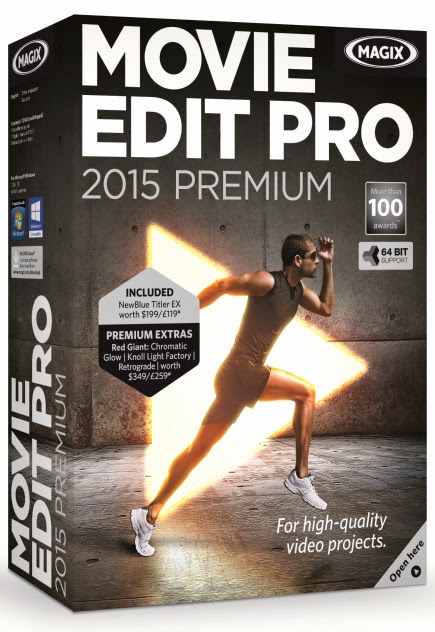
MAGIX Movie Edit Pro
2015 Premium
RRP:
£99.99
Exclusive
Premium plug-ins worth €347:
Red
Giant Retrograde: Genuine 8mm & 16mm film looks
Red
Giant Chromatic Glow: Adjustable illumination effects
Red
Giant Knoll Light Factory: Cinematic light reflections
About MAGIX:
About MAGIX:
MAGIX
is a leading international provider of high-quality software, online services
and digital contents for multimedia communications. Since 1993, MAGIX has been
developing leading technologies for creation, editing, management and
presentation of photos and graphics, videos and music. Internationally, MAGIX
operates from branches in the USA, Canada, the UK, France, Italy, Spain and the
Netherlands. The product range is targeted towards laymen and professionals
alike and goes beyond the PC range to include seamlessly integrated online and
mobile applications.
According
to its retail sales figures, MAGIX leads in the multimedia software sector in
Germany and the most important European markets, and is one of the most
successful competitors in the USA. Fifteen years of market presence as well as
one thousand awards worldwide testify to the company's power of innovation.
THANKS FOR READING...
Please check out the Synapse Circuit site here: Synapse Circuit.com
Yes, I am well aware that the site is due an update soon! It’s coming...
Synapse Circuit for tech news, opinions, articles, reviews and competitions. You will find interactive PDF magazines, videos and links to free legal software! Check it out at SynapseCircuit dot com
THANKS FOR READING...
Please check out the Synapse Circuit site here: Synapse Circuit.com
Yes, I am well aware that the site is due an update soon! It’s coming...
Synapse Circuit for tech news, opinions, articles, reviews and competitions. You will find interactive PDF magazines, videos and links to free legal software! Check it out at SynapseCircuit dot com