Showing posts with label Effects. Show all posts

Saturday, 15 April 2017

LESLIE SANFORD COBALT SYNAPSE CIRCUIT REVIEW

 SYNAPSE CIRCUIT 
LESLIE SANFORD

COBALT $FREE REVIEW!

#VST #VirtualStudioTechnology #Virtual #Studio #Technology #Steinberg #DAW #Instruments #Effects #Electronic #Music #ElectronicMusic #ComputerMusic #MusicTechnology #FutureMusic #LeslieSanford #Leslie #Sanford #Cobalt


Synapse Circuit brings you another great VST synthesizer in the form of...

COBALT OUT OF THE BLUE
You may be well aware of the plethora of free VST instruments and effects on the Web; you may also be aware that many of these freebies can be badly programmed. Great ideas and wonderful looking synths/effects poorly realized can have an adverse effect on your productivity. Nothing worse than a beautiful sounding synth that keeps causing your DAW to crash. Read on!
Behold… Leslie Sanford delivers a Cobalt out of the blue…

Do not worry if, as a novice, that the above means little or nothing to you. It is more important to get in there have mess around. That’s how you learn! I created a patch by fooling around, saved it and recalled it.

Above: Little Cobalt, big Cobalt.
IN AWE
Whenever I install what promises to be a decent free VST instrument or effect, I cross my fingers in the hope that it doesn't crash my DAW. It's worth noting that I'm using MAGIX Music Maker Premium in my ongoing tests. I recommend that you test these VST plugins with different DAWs; what crashes one DAW works perfectly well in others!

Well, that's the nature of these things. In the not too distant future, I'll be reviewing other DAWs! Stay tuned…

I'm happy to say that Cobalt is wonderfully realized. It was created to emulate classic synths of the 80s. Gosh! Cobalt sounds phenomenal!
SWEETNESS
The presets sound fantastic! Sweet! The bass instruments are varied, leads cuts the air like shrapnel flying through the air, and the pads are lush!

Those sounds can be used in any music genre. It's easy to program too! Cobalt is a must have!
SCORE
The graphical user interface (GUI) could have been better but the sounds are delicious! .

Cobalt scores a well-deserved Synapse Circuit Gold!

You can download it here: Cobalt
Enjoy!
Thank you for reading! Synapse Circuit / Blue Gene

Friday, 14 April 2017

NOIZEFIELD BOUNCE SYNAPSE CIRCUIT REVIEW

 SYNAPSE CIRCUIT 

NOIZEFIELD BOUNCE $FREE REVIEW!

#VST #VirtualStudioTechnology #Virtual #Studio #Technology #Steinberg #DAW #Instruments #Effects #Electronic #Music #ElectronicMusic #ComputerMusic #MusicTechnology #FutureMusic #Noizefield #Bounce


Synapse Circuit has great pleasure in bringing you yet another great synth, and it's FREE! 

MORE BOUNCE TO THE OUNCE
Bounce is a 6 oscillators subtractive synthesizer… OK, whatever that means… Ha ha! But seriously… It is designed for EDM, House, Future House, Dance, Melbourne Bounce, Trance and Dubstep other styles of Electronic music. In other words, the preset sounds are geared towards the genres mentioned above. The truth is that you can tweak the oscillators and other parameters to create your own unique patches. Read on!
For the technically minded, look below. If you are not technically minded then look below!

6 oscillators (Four oscillators with 32 waveforms each and two oscillators are wavedraw
oscillators), inclusive Phase, FM and RM and XMod.
Sync option for the osc 1-4.
Multimode - Filter (LP,HP,BP).
Noise generator (White Noise).
4 Envelopes (One amp and three modulation envelopes (Pitch/Filter/FM).
2 tempo-synced LFOs.
Effects: Chorus, Equalizer, Decimator, Reverb, Fatner.
Portamento for gliding sounds.

Do not worry if, as a novice, that the above means little or nothing to you. It is more important to get in there have mess around. That’s how you learn! I created a patch by fooling around, saved it and recalled it.

Above: The saving and retrieval of a patch. Oh, when you save a patch (a synth sound) based on one of the presets, you can’t revert back to the original sound. In order to revert to the original sound you have to reload the Bounce. This is a minor irritation that doesn’t spoil the whole deal. Also, whatever you have named the new sound that you have created does not show up on the interface. Odd! So, that’s two minor irritants. SCORE
If not for the two minor irritations I would have liked to have given Bounce a possible Platinum. The interface looks good, the parameters can be easily modified to create new and compelling sounds, and it presented no problems in that it did not cause the MAGIX Music Maker DAW (digital audio workstation), used for the test, to crash. It is well programmed.

Bounce scores a super Synapse Circuit Gold!

You can download it here: Noizefield Bounce

Enjoy!
Thank you for reading! Synapse Circuit / Blue Gene

Wednesday, 12 April 2017

NOISEBUD BURT 2.0 SYNAPSE CIRCUIT REVIEW

SYNAPSE CIRCUIT 

NOISEBUD BURT 2.0 $7.99 REVIEW!

#VST #VirtualStudioTechnology #Virtual #Studio #Technology #Steinberg #DAW #Instruments #Effects #Electronic #Music #ElectronicMusic #ComputerMusic #MusicTechnology #FutureMusic #Noisebud #Burt


Synapse Circuit has kicked off with the start of a long running Computer Electronic Future Music Technology string of reviews! 

BOLDLY GOING...
“The entity Noisebud can pretty much do whatever it likes and not care about anyone or anything else…”

I like that… Bold! Noisebud are Sol and Johannes from Sweden. These men are accomplished Electronic musicians but makers of some wonderful VST instruments and effects. And here’s the Synapse Circuit review of Burt 2.0! Read on!

THERE ARE NO COINCIDENCES
How I stumbled upon Burt 2.0… I was looking for some free VST plugins to test MAGIX Music Maker 2017 Premium. Very often, some of these free VST instruments and effects would crash Music Maker. The plan is to do a small follow-up review on the stability of Music Maker with free VST! Standby for that review…

In the meantime I have downloaded quite a few freely available VSTs. For some reason Burt 2.0 was outstanding. I think it was the interface that did it. I found it on a free VST specific website and I went from there straight to the Noisebud website. I saw there are two versions, one free and the other asked for a small donation fee of $7.99 and I had to have it! The donation version allows some of the presets to be controlled by a modulation wheel. Darn it! I need a USB music keyboard with a mod wheel on it! That’s next on my list! Anway…

WOW
What I love about Burt 2.0 are the beautifully distorted and aggressive presets. Gorgeous sounds! Burt 2.0 is the kind of synthesizer that Electronic music purists will just fall in love with. At first I had an issue with getting some sound out of Burt 2.0 with Music Maker… I contacted Noisebud and they came up with this solution:

“The steps listed below is a bit different between the Windows versions, so don't panic if it looks slightly different:

- Use Windows Explorer to browse to your VST Plugins folder.
- Right-click the folder - 'Properties'
- Choose 'Security' tab.
- Click 'EDIT' (You may need to click a UAC prompt).
- Select username "Users".
- Tick options Allow 'Write' and 'Modify'.
- To finish Select 'OK' to close the two dialog boxes.

When all this is done, reinstall Burt and launch you DAW and see if it works.”

That did the trick! It may not be necessary to deinstall reinstall Burt 2.0. This is what I did:

I located the VST folder that I installed Burt 2.0 in and then edited the folder properties as detailed above. I then launched Music Maker, went to the settings, added the VST folder and I could see straightaway that Burt 2.0 had been utilized and it became available in the instrument selection. I dragged one instance of Burt 2.0 across and low and behold, sound came out! YAY!

NO PRETENSE
I can’t pretend to know everything there is to know about a synthesizer to be able to explain on a scientific level about what all the knobs do, but the knobs are labelled clearly thus give an indication as to what they do. I had great fun messing around with the knobs going through the presets. I tend to find a sound that is closest to the one that is bouncing around in my head and proceed to tweak the settings until I intuitively get that sound that I am after. I can see that I will have hours of fun coming up with some rather dirty gritty sounds!

I haven’t made any music in ages and I can tell you that Burt 2.0 has inspired me to get making some tracks again! I have to find the time in-between writing and other things!

CONCLUSION
If you want a simple and effective VST synth for all genres of Electronic music without paying a king’s ransom then Burt 2.0 will do it for you. It’s pure and raw. It is very programmable. The knobs are fully automated too! Oh, automation - if you are new to Computer Music - is when you are able to record the movement of VST instrument and effects knobs, sliders, and dials, etc. The recorded movement can then be played back as a performance. It’s like messing with the knob of the (in)famous Roland TB-303 to create that definitive Acid sound.

SCORE
Burt 2.0 scores a well deserved Synapse Circuit Gold!

You will be amazed by the sounds and the scope! Believe!
Thank you for reading! Synapse Circuit / Blue Gene

Tuesday, 11 April 2017

SYNAPSE CIRCUIT VST AND MUSIC TECHNOLOGY NEWS!

SYNAPSE CIRCUIT 

VIRTUAL STUDIO INSTRUMENTS, EFFECTS & MUSIC TECHNOLOGY HARDWARE! NEWS!

#VST #VirtualStudioTechnology #Virtual #Studio #Technology #Steinberg #DAW #Instruments #Effects #Electronic #Music #ElectronicMusic #ComputerMusic #MusicTechnology #FutureMusic


Synapse Circuit will be reviewing VST instruments, effects and Music Technology hardware! It's been a long time coming! 


ELECTRONIC COMPUTER FUTURE MUSIC TECHNOLOGY
DAW or Digital Audio Workstation applications have come a long way. More and more people are getting into music production as these DAWs have become very inexpensive and delivering professional sounding results. Judging by the amazing response to the Synapse Circuit review of MAGIX Music Maker 2017 Premium, the time is right for Synapse Circuit to venture out into the realms of Music Technology, Computer Music, Future Music Tech - whatever! The idea is not to end up being a catalog for Electronic Computer Music with the bias ethos, "You need this to be professional," but to let You, the Synapse Circuit Reader, know what's out there! Stay tuned for some great Electronic Computer Future Music Technology reviews! To be clear, it's VST instruments and effects, and Music Technology hardware such as USB audio devices, keyboards (musical), speakers, etc. If Synapse Circuit can get hold of it, then it will be reviewed! Watch this space! Thank you for reading! Synapse Circuit / Blue Gene

Friday, 7 April 2017

MAGIX MUSIC MAKER 2017 PLATINUM SYNAPSE CIRCUIT REVIEW

SYNAPSE CIRCUIT 

Reviews... MAGIX MUSIC MAKER 2017 PLATINUM

£89.99

#MAGIX #Music #Maker #Platinum #MusicMaker #VST #Soundpool #ComputerMusic
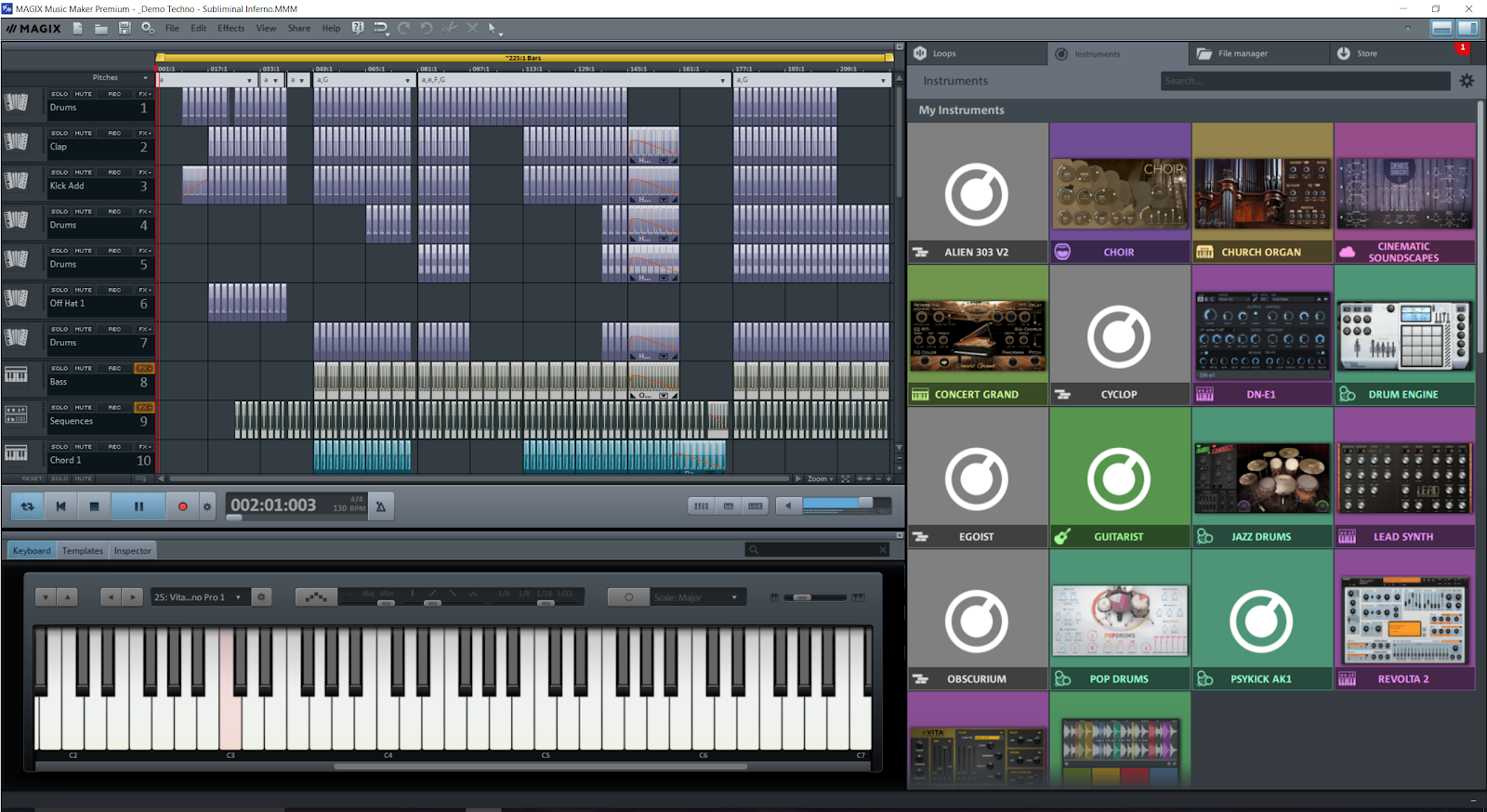
MAGIX is on a mission; it's an unrelenting multimedia machine that has no off switch. It has just acquired Sony's dying video and music applications, Vegas and ACID respectively and breathed​ new life into them. Reviews coming soon… The question has to be asked: Has the MAGIX staple, Music Maker (Premium) suffered as a result? Well, let's take a look at the 2017 version of Music Maker Premium.

INSTRUMENT FACE.png
WHAT'S NEW?
Like MAGIX, the Music Maker Premium interface has gotten yet another thoughtful interface makeover. So far, so good! Sample loops and instruments are now flushed to the right for easy access and it takes one click to move it out of the way so that you're left with just the tracks. You can get rid of the bottom half of the interface containing the virtual keyboard, templates and inspector just as easily.


The result is an uncluttered and solid workspace, it was long overdue! The interface has always been good but a little problematic at times. The residual interface pixel phenomenon is no more. In other words, part of the interface no longer replicates inexplicably on the screen when introducing instruments on the track timeline and hang there (on the screen) when the application is minimized. At last! That was so annoying! Residual pixels up on the screen is an irritating distraction; I'm glad it's no more!


GONE!
I was a little shocked to see that the mainstay “object” virtual instruments, BeatBox, Robota, LiViD, Atmos, and Loop Designer are gone! What??? It's hard to stomach! Okay, Robota and LiViD were not perfect and I won't miss them… … Well, to be fair, Robota had some awesome Electronic music presets that serves the genres of Techno and Industrial exceptionally well!


I loved the BeatBox as the drum machine grid made creating drum/percussion patterns easy and fun. And I must say that the Loop Designer was pretty good at rearranging beat loops; it was a little flawed but used creatively, it could make for some very inspirational beats.
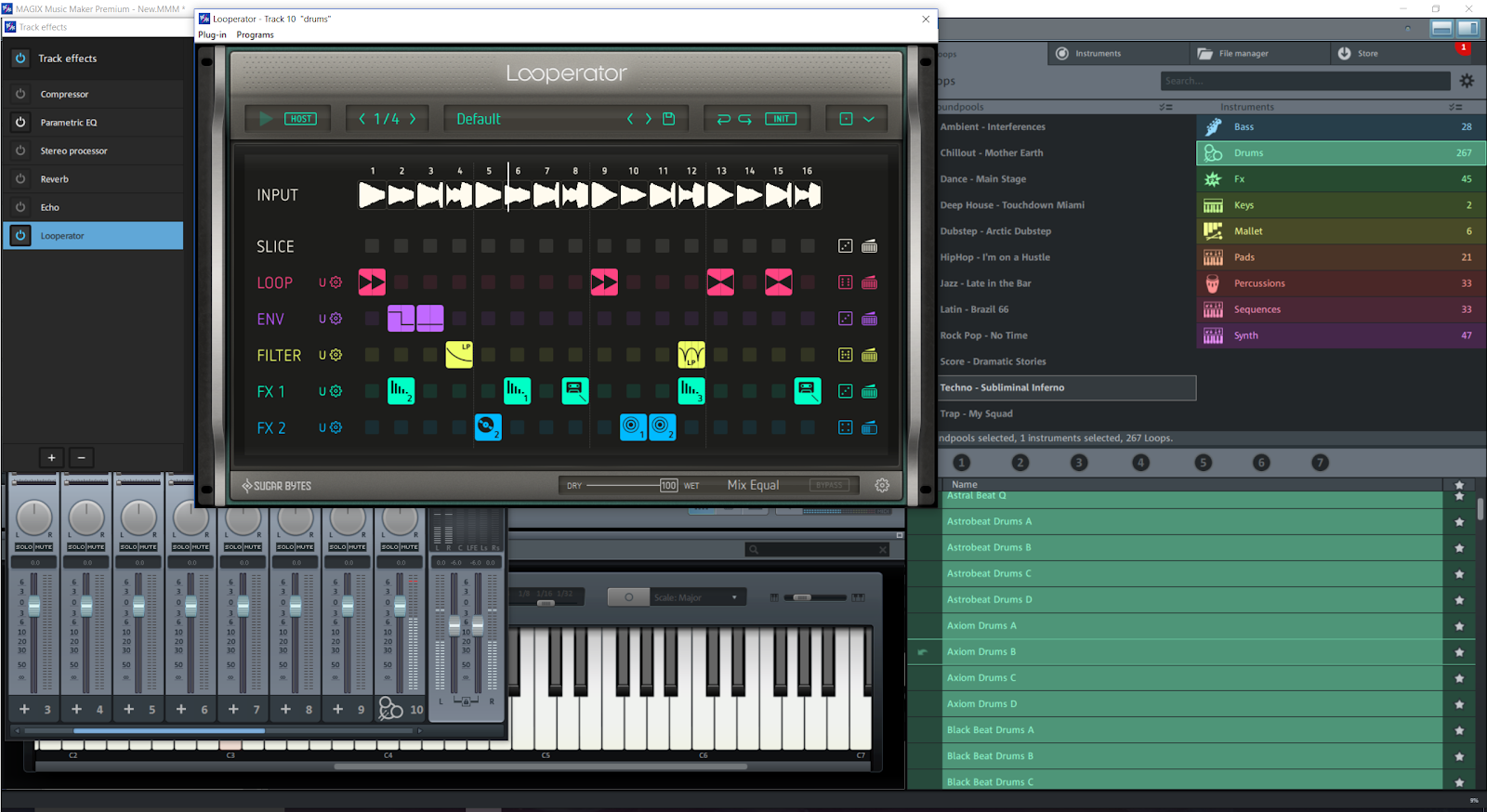
LOOPERATOR.png
Above: Sugar Bytes Looperator in action with Music Maker 2017 Platinum. Looperator can take the place of the now defunct Loop Designer. Just in case it is not clear: Looperator does not come with Music Maker Premium. Looperator, like all the external instruments and effects used in this review, can be purchased from the Sugar Bytes website.

The main issue with the Loop Designer was that it was extremely fussy about accepting sample loops; it worked mainly with MAGIX's own “Soundpool” loops that came with Music Maker Premium by default. Thankfully, with regards to replacing the Loop Designer, you'll be pleased to know that MAGIX Music Maker Premium 2017 works with advanced VST instruments and effects such as the Looperator by Sugar Bytes. The Looperator is, if you like, the evolution of the Loop Designer.


I do think that MAGIX could've hybridized the BeatBox and Robota drum machines​. Yes, the Drum Engine virtual instrument takes over all drum/percussion duties but the BeatBox had its place! The 2016 version contains all the drum/percussion instruments mentioned above plus Urban Drums which is an awesome beat machine aimed at Hip-hop and Dubstep containing some nice effects on it. With the 2017, you have to buy the Urban Drums along with some other instruments.


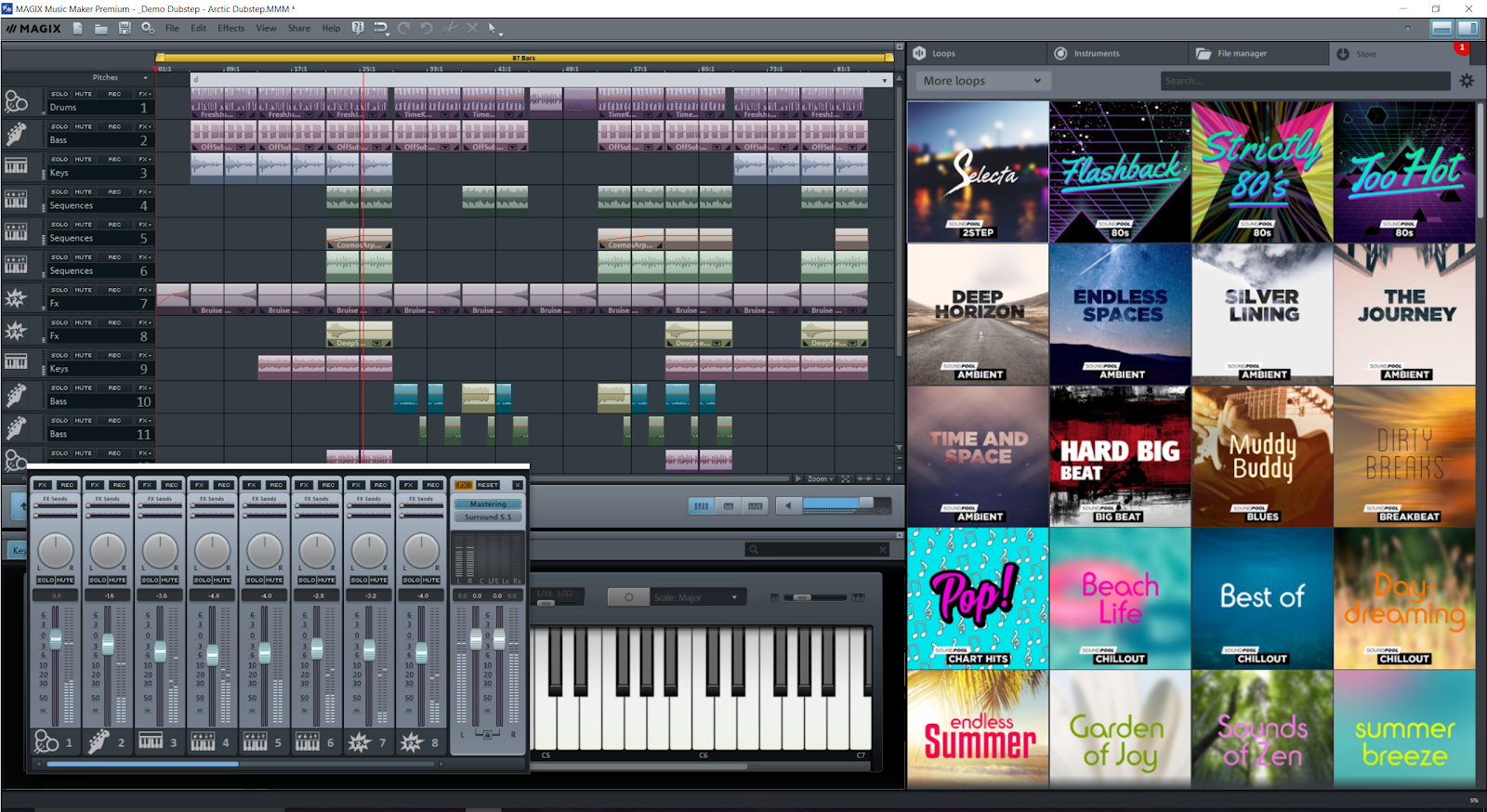
You can purchase and download more instruments (and sound loops) from within Music Maker Premium at the cost of £25 each. It does not appear that these additional instruments are compatible with other DAW (Digital Audio Workstation). I did try to see if I could use the instruments found in the 2016 to no avail.

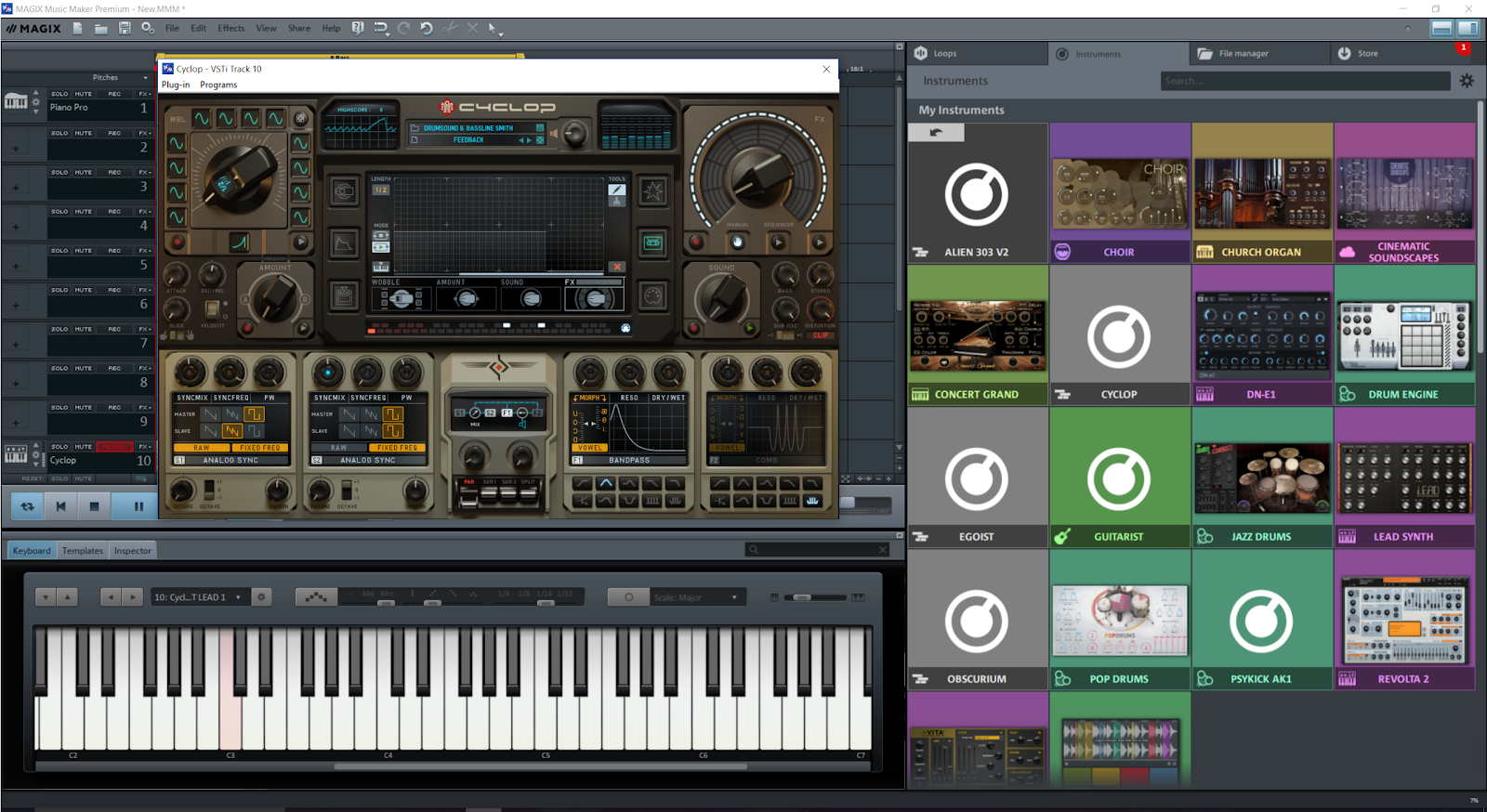
CYCLOPS.png
Above: Cyclop by Sugar Bytes. It is a great synth for wobble basslines!

IN USE
I've always appreciated the Music Maker ease of use ethos and it remains very user-friendly. You drag 'n’ drop loops and instruments - even video - upon the tracks to create professional sounding compositions.


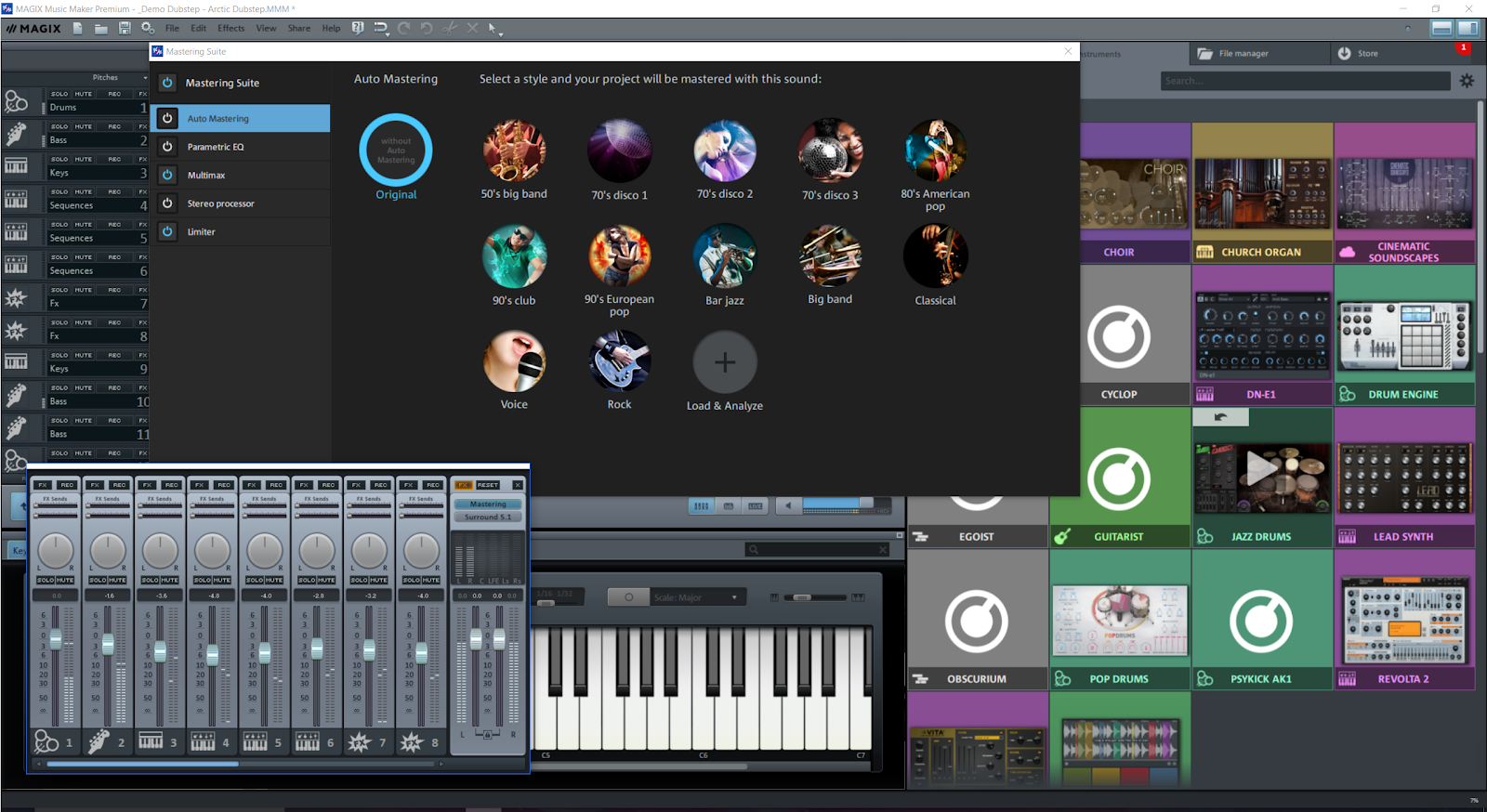
The Mastering Suite remains easy to add polish to the overall finished tracks. There some good templates but you're not going to get lost in getting the sound you want for your music.


Music composition remains transparent; fuss free in this latest Music Maker Premium!
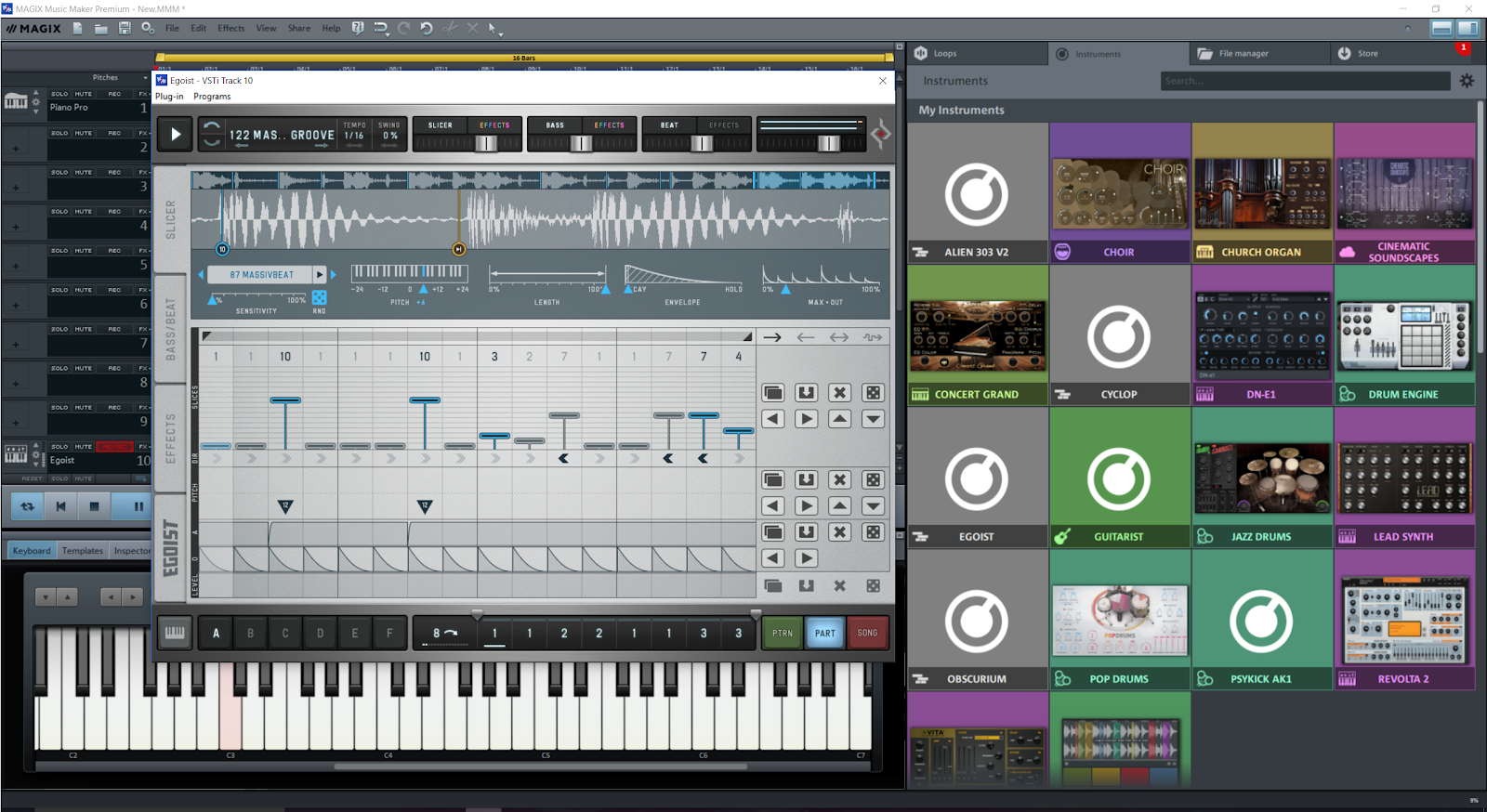
EGOIST.png
Above: Egoist by, yes, you’ve guessed it, Sugar Bytes.

PROFESSIONALISM
It has gotten to a point where the Digital Audio Workstation has reached the pinnacle in terms of what is deemed as “professional” features on a base level. It has been long established that masses of hardware isn't necessary to create a home music studio. You just need a decent PC, a microphone, USB keyboard, and Music Maker Premium.


Music Maker Premium is a very capable DAW that utilizes VST instruments and effects just like other DAW costing considerably more! If you are in the process of building a studio you might want to check out MAGIX Samplitude Pro X3! Review coming soon!


GLITCHES
I did notice that Music Maker Premium had some difficulty in finding some VST instruments. I'm not too sure why but I found that I reinstalling the VST instruments did the trick!


I was a little concerned with Music Maker Premium crashing for no logical reason during the test, however, after downloading an update the stability was restored.
MASTER.png
Above: The new Mastering Suite that makes it easy to add a professional sheen to the finished track!
CONCLUSION
Music Maker Premium 2017 has evolved into an outstanding professional music production suite. It's great as a level entry application and it's got more than enough attributes for more experienced users.


I would like to see a return of “object” instruments as that aspect reminds me of the way in which FL Studio works, what with it's pattern based input. I feel that FL Studio has a certain predefined sound that's hard to get away from whereas Music Maker Premium allows me to add color - so to speak - to whatever music I'm making.


Now that Synapse Audio (no relation) Orion Studio has bit the digital dust, I will state MAGIX Music Maker Premium is the best budget and most easy to use DAW out there!
SHOP.png
Above: You can purchase sound loops in the form of “Soundpools” and instruments from within the application.
FINAL THOUGHTS & OBSERVATIONS
I look at the amount of newly released Digital Audio Workstations such as Bitwig, Studio One, and Sequel wondering what it is these applications are trying to achieve. It appears to me that these newcomers are trying to emulate Music Maker Premium for ease of use and be a self-contained solution to budding music producers (with accessibility to external VST instruments and effects). But the prices of these new DAW doesn't add up to something worthwhile - in my humble opinion.


Music Maker Premium is unsurpassed for ease of use, features and value for money! Plus it looks great too! Let's look at the Reason application in comparison…


Reason is closed off and can't be extended with VST instruments and effects. It costs £320 to Music Maker Premium at £90. With the £230 you've saved you can put it towards some phenomenal VST instruments and effects!


Add a USB audio interface and you've got a decent home studio. In theory, it's possible to use that £230 to purchase both a USB audio interface and a decent VST instrument/effect.


I would invest in MAGIX Music Maker Premium any day of the week.

OH! ONE MORE THING!
The reason (no pun intended) why I featured Sugar Bytes instruments and effects in this review is because they are some of the most sophisticated VST instruments and effects available! Music Maker 2017 Premium can handle the aforementioned instruments and effects without crashing! Hook up a USB keyboard and Music Maker 2017 Premium and other versions will find it, no problem.

What can cause crashes are the freely downloadable VSTs out there. I may do another review solely based upon use with these free VSTs. Sometimes the programming of these free instruments and effects can cause any DAW to crash. The ones that I used did not present any problems.


MAGIX Music Maker Premium scores a Synapse Circuit Platinum!
Start making music today!


Thank you for reading!


Synapse Circuit/Blue Gene