 |
| Has the best WYSIWYG web design program on the market gotten better? |
SYNAPSE
CIRCUIT
SERIF WEBPLUS X7 REVIEW
#Serif #WebPlusX7 #SerifWebPlusX7 #WebDesign
Good evening, Synapse Circuit Readers! How are you? How was your day? It was such a beautiful spring day earlier! I hope the weather is being good to you wherever you may be!
Yes, the Mobile World Congress is over and, as promised, it’s time to bring you some reviews! Yay! If you have been following my articles on the subject of Web Design then you may be delighted with this WYSIWYG offering from Serif, WebPlus X7! Read on...
WEBPLUS X7: REGISTRATION & INTERFACE
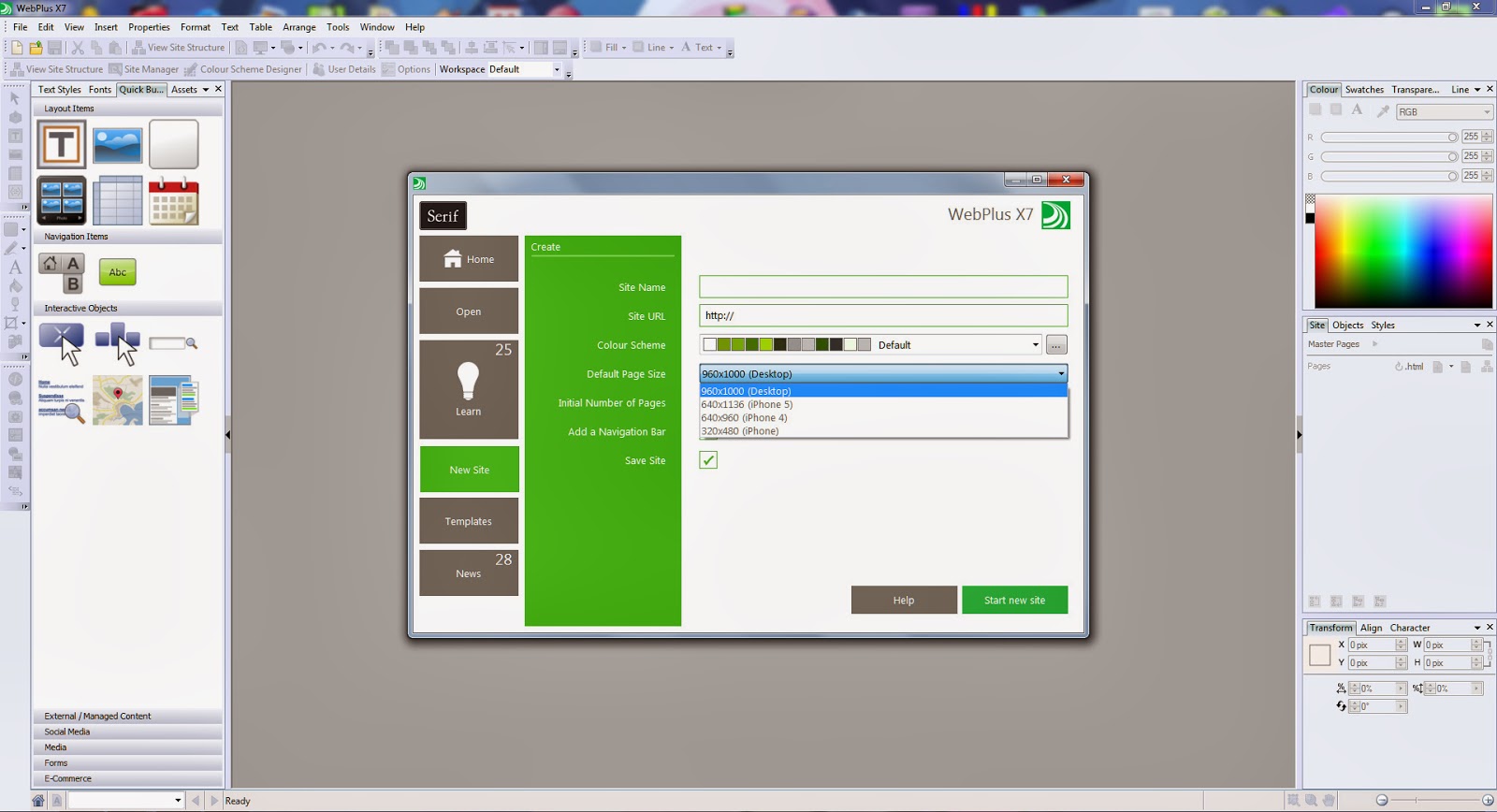
Once installed I was, once again, pleasantly surprised with the fantastic job that Serif has done to update the familiar interface. The interface is truly outstandingly sleek and leads to effortless productivity!
Once you register the program through a toll free phone call you then get more navigation button styles which are brilliant – especially the ones aimed at the music industry! Well done!
SO, WHAT ELSE IS NEW?
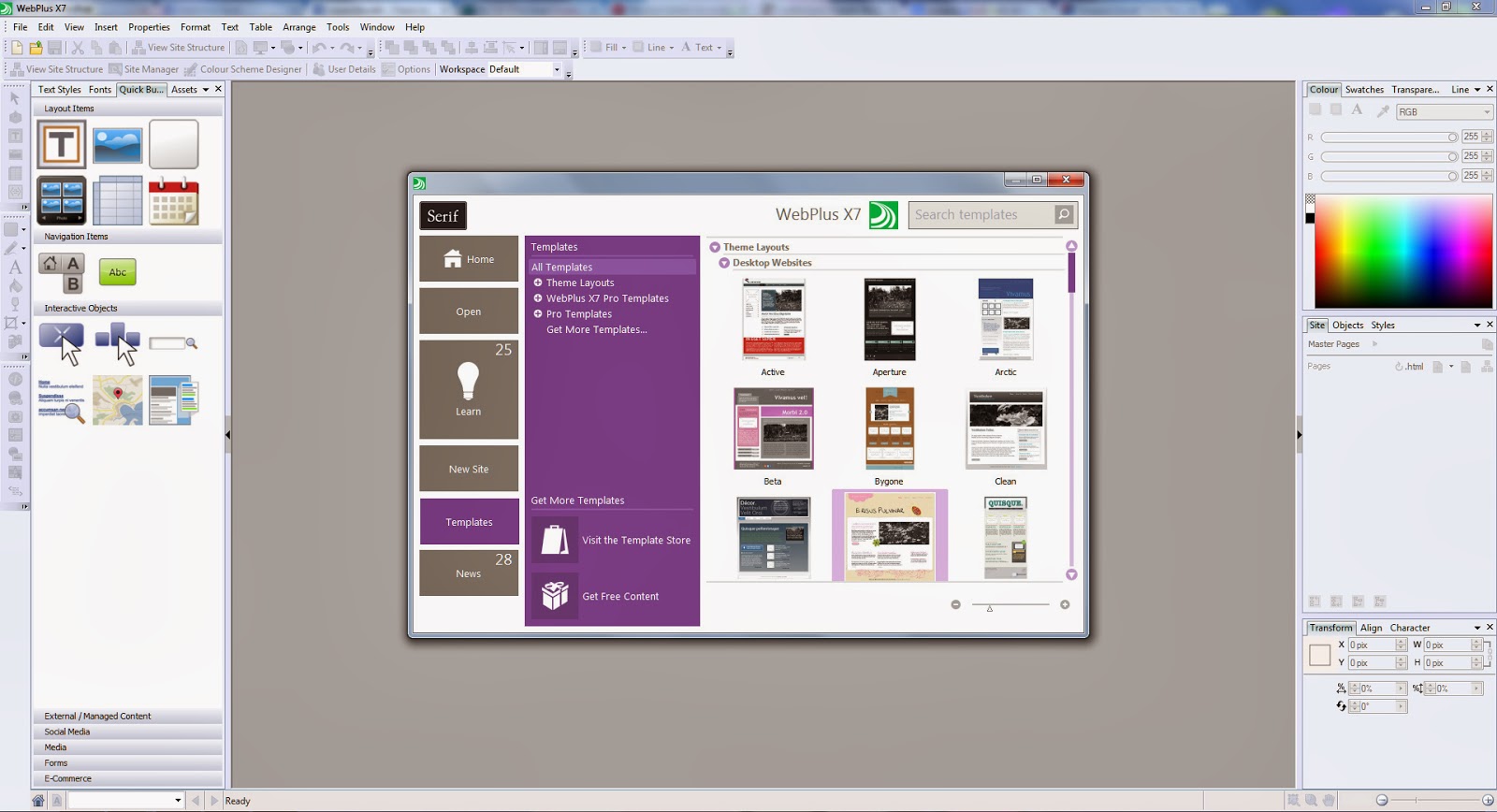
The way you start a project has changed whereby you are given more of a selection: in the first instance we have 3 sample sites to introduce you to the ‘assets’, ‘sliders’ and ‘video’.

If you are familiar with previous versions of WebPlus you may wish to start a new web design project straightaway. What you will notice is that you are faced with options to start a desktop or mobile (iPhone oriented) sites. Yes, usually with Android handsets you can view a desktop site with relative ease due to the larger displays sporting a high resolution. But, yes, the choice to start a mobile site is there!
Most importantly, you can have instant access to excellent tutorials.
CSS EDITING
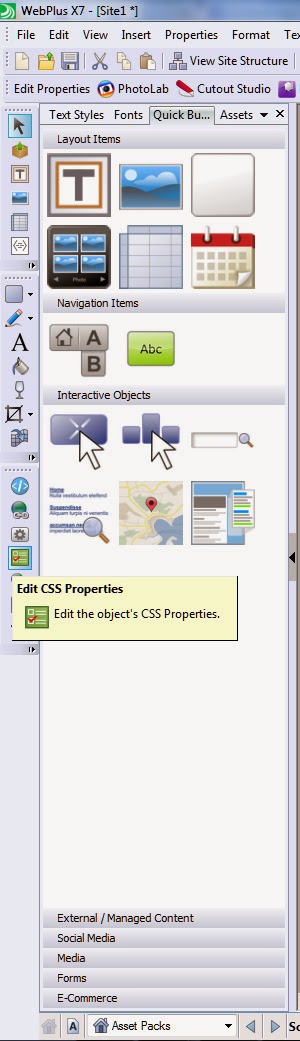
Just in case you haven’t been following my web design articles and you are completely new to web design you should know that CSS stands for cascading style sheets. Essentially, what CSS does is to give the website a style structure in how it displays fonts, layout, navigation buttons, etc. Please do not worry about CSS at this stage; very, very fortunately Serif has made it easy for you to edit the look of navigation buttons, background images and so on. You just click on the object that you wish to change and then choose the ‘Edit CSS Properties’ tool. Easy! However, it wouldn’t hurt to know a bit about CSS as it can be helpful to use some fantastic free CSS resources available online!
We’ll come to adding extra bits of code such as HTML and CSS later...
HTML5 & CODE
WebPlus X7 supports HTML5 which has practically replaced Adobe Flash for simple animation, sliders, navigation / buttons, sound, video and more.
What I appreciate and what experienced HTML coders will appreciate is that it is now very easy to see the HTML code of a particular aspect of the site. Cool! So, if you are able to code you may find it easier – possibly faster to edit aspects of your site.
Learning to code HTML is not difficult; some find it laborious and some find it preferable to make the code as lean as possible. It is a known fact that some WYSIWYG web design programs can produce bad code which may prove to be a disaster in different web browsers. Most coders I know were there from the start of the worldwide web and had to code because no program existed. I got there a little later. Lol! That’s why I do not like coding from scratch.
It is useful to know a bit about code because it allows you to insert HTML snippets that can be gotten via the Internet. It’s a matter of knowing where to add the snippets. You can add things like JavaScript and CSS for example. There are other sorts of code such as CGI = common gateway interface and PHP = Personal Home Page (Tools) and more besides. In an ideal world we’d be fully fluent in these coding languages. For the most part you won’t need PHP and CGI when using WebPlus X7 as it has a feature called ‘Smart Objects’ that enables the processing of interactive elements such as form handling, polls, forums, mailing lists and more. Usually such items would be processed using CGI and / or PHP. Now continuing with talking code...
VIDEO
Yes, you’re probably wondering why I am continuing with the subject of code when talking video... Bear with me...
You’ll be pleased to know that there is a new video player included in the bag of tricks! You can now add your own videos free of YouTube if that is desirable. The player can be customised to match the colour scheme of your website. The possible downer is that you are left with the watermark from the video player originator, Flowplayer. If you want to get rid of the logo there are paid options to do so. Check out the Flowplayer site: https://flowplayer.org/pricing/
SERIF WEBPLUS X7 REVIEW
#Serif #WebPlusX7 #SerifWebPlusX7 #WebDesign
Good evening, Synapse Circuit Readers! How are you? How was your day? It was such a beautiful spring day earlier! I hope the weather is being good to you wherever you may be!
Yes, the Mobile World Congress is over and, as promised, it’s time to bring you some reviews! Yay! If you have been following my articles on the subject of Web Design then you may be delighted with this WYSIWYG offering from Serif, WebPlus X7! Read on...
WEBPLUS X7: REGISTRATION & INTERFACE
Once installed I was, once again, pleasantly surprised with the fantastic job that Serif has done to update the familiar interface. The interface is truly outstandingly sleek and leads to effortless productivity!
Once you register the program through a toll free phone call you then get more navigation button styles which are brilliant – especially the ones aimed at the music industry! Well done!
SO, WHAT ELSE IS NEW?
The way you start a project has changed whereby you are given more of a selection: in the first instance we have 3 sample sites to introduce you to the ‘assets’, ‘sliders’ and ‘video’.
If you are familiar with previous versions of WebPlus you may wish to start a new web design project straightaway. What you will notice is that you are faced with options to start a desktop or mobile (iPhone oriented) sites. Yes, usually with Android handsets you can view a desktop site with relative ease due to the larger displays sporting a high resolution. But, yes, the choice to start a mobile site is there!
Most importantly, you can have instant access to excellent tutorials.
CSS EDITING
Just in case you haven’t been following my web design articles and you are completely new to web design you should know that CSS stands for cascading style sheets. Essentially, what CSS does is to give the website a style structure in how it displays fonts, layout, navigation buttons, etc. Please do not worry about CSS at this stage; very, very fortunately Serif has made it easy for you to edit the look of navigation buttons, background images and so on. You just click on the object that you wish to change and then choose the ‘Edit CSS Properties’ tool. Easy! However, it wouldn’t hurt to know a bit about CSS as it can be helpful to use some fantastic free CSS resources available online!
We’ll come to adding extra bits of code such as HTML and CSS later...
HTML5 & CODE
WebPlus X7 supports HTML5 which has practically replaced Adobe Flash for simple animation, sliders, navigation / buttons, sound, video and more.
What I appreciate and what experienced HTML coders will appreciate is that it is now very easy to see the HTML code of a particular aspect of the site. Cool! So, if you are able to code you may find it easier – possibly faster to edit aspects of your site.
Learning to code HTML is not difficult; some find it laborious and some find it preferable to make the code as lean as possible. It is a known fact that some WYSIWYG web design programs can produce bad code which may prove to be a disaster in different web browsers. Most coders I know were there from the start of the worldwide web and had to code because no program existed. I got there a little later. Lol! That’s why I do not like coding from scratch.
It is useful to know a bit about code because it allows you to insert HTML snippets that can be gotten via the Internet. It’s a matter of knowing where to add the snippets. You can add things like JavaScript and CSS for example. There are other sorts of code such as CGI = common gateway interface and PHP = Personal Home Page (Tools) and more besides. In an ideal world we’d be fully fluent in these coding languages. For the most part you won’t need PHP and CGI when using WebPlus X7 as it has a feature called ‘Smart Objects’ that enables the processing of interactive elements such as form handling, polls, forums, mailing lists and more. Usually such items would be processed using CGI and / or PHP. Now continuing with talking code...
VIDEO
Yes, you’re probably wondering why I am continuing with the subject of code when talking video... Bear with me...
You’ll be pleased to know that there is a new video player included in the bag of tricks! You can now add your own videos free of YouTube if that is desirable. The player can be customised to match the colour scheme of your website. The possible downer is that you are left with the watermark from the video player originator, Flowplayer. If you want to get rid of the logo there are paid options to do so. Check out the Flowplayer site: https://flowplayer.org/pricing/
It would have been
ideal if Serif had provided more video (and audio) player options – especially as
there are some free and / or cost effective media players out there. Check out
the JPlayer! This is where you need to understand a little bit of code in order
to insert this wonderful code that will give you an audio and video player for
free! Yes, FREE!!!! Sure, you can purchase customizable skins for a very, very
reasonable price. Check it out: http://www.jplayer.org/
The instructions on
how to use the skin is pretty much straightforward if you can’t live with the
Flowplayer watermark appearing in your video.
In addition you have YouTube and Vimeo players that you can add to your web page. However, the YouTube video component allows you to add a playlist which is very, very handy if you make loads of video content. With a bit of luck you can earn some cash through monetizing your YouTube videos.
CONCLUSION
Serif has delivered one of the best WYSIWYG web design programs on the market today! I recommend it! It has the edge over the competition for ease of use and the Smart Objects goes that extra mile to empower the non-coder. Trust me it is a relief to receive form results using that method (Smart Objects). PHP is a good method of processing forms, etc but you really have to know what you’re doing. Just one character in the wrong place can render the PHP coding useless!
Serif WebPlus X7 has so much going for it that you’ll be wondering what you’d have done without it. Oh, don't forget the fantastic array of clipart from social network icons to usable photos and illustrations. Awesome!
If you want to build websites painlessly then Serif WebPlus X7 is the way to go!
FURTHER READING:
PART ONE
http://synapse-circuit.blogspot.co.uk/2014/02/synapse-circuit-web-design-today-how-to.html
PART TWO
http://synapse-circuit.blogspot.co.uk/2014/02/synapse-circuit-web-design-today-2.html
PART THREE
http://synapse-circuit.blogspot.co.uk/2014/02/synapse-circuit-web-design-three-design.html
WEBPLUS X6 REVIEW: ISSUES #02 & #04
http://www.synapsecircuit.com/issues.html
Thank you for watching and reading!
Please check out the Synapse Circuit website for video, i-PDF and more!
Synapse Circuit Dot Com
In addition you have YouTube and Vimeo players that you can add to your web page. However, the YouTube video component allows you to add a playlist which is very, very handy if you make loads of video content. With a bit of luck you can earn some cash through monetizing your YouTube videos.
CONCLUSION
Serif has delivered one of the best WYSIWYG web design programs on the market today! I recommend it! It has the edge over the competition for ease of use and the Smart Objects goes that extra mile to empower the non-coder. Trust me it is a relief to receive form results using that method (Smart Objects). PHP is a good method of processing forms, etc but you really have to know what you’re doing. Just one character in the wrong place can render the PHP coding useless!
Serif WebPlus X7 has so much going for it that you’ll be wondering what you’d have done without it. Oh, don't forget the fantastic array of clipart from social network icons to usable photos and illustrations. Awesome!
If you want to build websites painlessly then Serif WebPlus X7 is the way to go!
FURTHER READING:
PART ONE
http://synapse-circuit.blogspot.co.uk/2014/02/synapse-circuit-web-design-today-how-to.html
PART TWO
http://synapse-circuit.blogspot.co.uk/2014/02/synapse-circuit-web-design-today-2.html
PART THREE
http://synapse-circuit.blogspot.co.uk/2014/02/synapse-circuit-web-design-three-design.html
WEBPLUS X6 REVIEW: ISSUES #02 & #04
http://www.synapsecircuit.com/issues.html
Thank you for watching and reading!
Please check out the Synapse Circuit website for video, i-PDF and more!
Synapse Circuit Dot Com


